

-
Author
-
August 23, 2015 at 15:36 #74216
ARCHE
ParticipantHi guys,
Could you please help me with this:
I would like that ALL images that are inserted within Blog Posts could have this caption style (or something similar):

I am happy with the default caption style for Portfolio Items, I would like to change ONLY the one in Blog Posts. Thank you in advance!
August 23, 2015 at 19:44 #74242ParticipantI don’t know if this is the best way of doing it but this CSS seems to be a good solution for me:
COPY CODE.wp-caption p.wp-caption-text { float: left; margin-top: 15px; margin-left: 20px; border-left: 1px solid #e7e7e7; font-size: 13px; line-height: 18px; text-align: left; }I put this as Custom CSS for every blog post. Can you suggest me a better way to have this? Without inputting custom CSS for every single post? Thanks!
August 24, 2015 at 13:26 #74324sharmstr
ModeratorEvery wp page type as a body class that has the type. So try this
COPY CODE.single-post .wp-caption p.wp-caption-text { float: left; margin-top: 15px; margin-left: 20px; border-left: 1px solid #e7e7e7; font-size: 13px; line-height: 18px; text-align: left; }Hi there!!! Help others from the community and mark any reply as solution if it solved your question. Mark as a solutionAugust 24, 2015 at 21:37 #74414ParticipantHi @sharmstr,
Thank you. Is there a way to target only the captions within Blog Posts? Because when I put the code you suggested in Appearance > Editor it changes also the captions of Portfolio items.
Also, can you please suggest me a way to make the caption sit on the right side of the image? Like this sample:
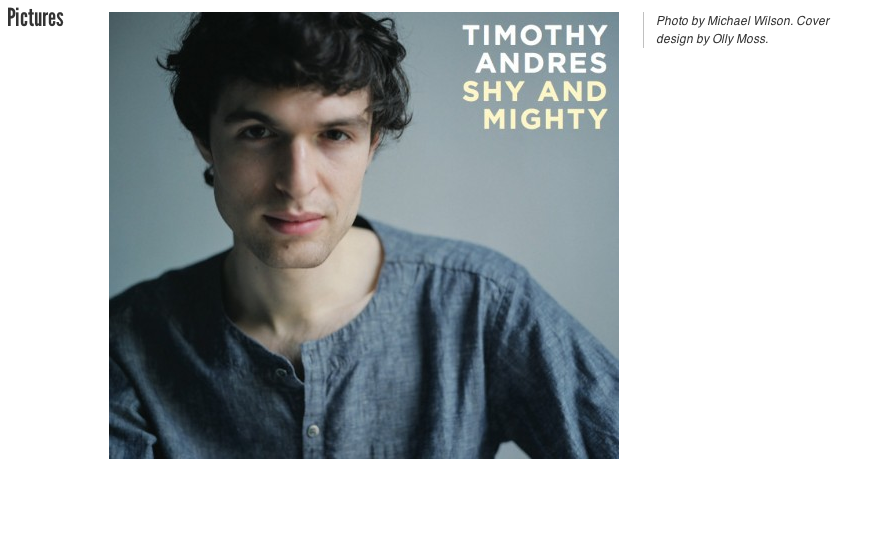
Thank you again.
August 24, 2015 at 22:22 #74420ModeratorIt shouldn’t. Portfolios use .single-portfolio. Perhaps something else is going on. Provide a link.
Hi there!!! Help others from the community and mark any reply as solution if it solved your question. Mark as a solutionAugust 24, 2015 at 22:41 #74424ParticipantYeah, I think something else is going on because now I have removed the code from Appearance > Editor and from every single post but still they are appearing with customised caption.
Here is a post link: http://www.archicostudio.com/blog/expo-2015-italian-pavilion/
Here is a portfolio item link: http://www.archicostudio.com/projects/plus-minus/Here are the credentials:
username: support-team
email: chella.fajardo@gmail.com
pw: helpAugust 24, 2015 at 22:50 #74425Moderatorcredentials dont work
Hi there!!! Help others from the community and mark any reply as solution if it solved your question. Mark as a solutionAugust 24, 2015 at 22:58 #74426Participantusername: support-team
email: chella.fajardo@gmail.com
pw: helpNow should be fine, I just logged in.
August 24, 2015 at 22:59 #74427Participantops, please set my previous msg as private if you can thanks.
August 24, 2015 at 23:35 #74431ModeratorI used the code I gave you and it works fine as far as only doing it on posts and not portfolios.
Hi there!!! Help others from the community and mark any reply as solution if it solved your question. Mark as a solutionAugust 24, 2015 at 23:46 #74432ParticipantThanks sharmstr! I must have some caching issues, checked it from another browser and from another computer and you were right, it works OK…
Another thing about caption styling… do you think it is possible to have the caption at the right side of the image? Would this be a quick fix?
Thank you!
-
AuthorPosts
The forum ‘KLEO’ is closed to new topics and replies.