-
Author
-
May 8, 2014 at 00:19 #17123
ahmadfaiz11
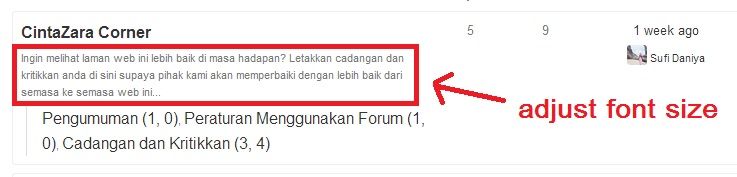
ParticipantHow to adjust font size of description in forum? Please refer to image….I cannot read it because the size is so small…
May 12, 2014 at 19:34 #17601Abe
KeymasterYou should inspect the elements using Chrome browser to style different parts of the site using CSS. for that part this CSS should do it:
COPY CODE.bbp-forum-content > p { font-size: 14px; }Hi there!!! Help others from the community and mark any reply as solution if it solved your question. Mark as a solution---
@ SeventhQueen we do our best to have super happy customers. Thanks for being our customer.May 15, 2014 at 20:15 #18040Abe
KeymasterI don’t understand your question. Put the link to your page please
Hi there!!! Help others from the community and mark any reply as solution if it solved your question. Mark as a solution---
@ SeventhQueen we do our best to have super happy customers. Thanks for being our customer.November 27, 2014 at 12:27 #36863sermsak
ParticipantHello. Abe
When i choose Users – Profile field – Field Type is Checkboxes
The text at the Headline of that Field is smaller than others Field.
( Only, when choose “Checkboxes” )Please see attached file.
Please helpThank you
P.S-I love your support style , everything is CLEAR , Answer to the point , and can FIX the issue.And You’re a man who have a Knowledge base. PROFESSIONAL
Attachments:
You must be logged in to view attached files.December 3, 2014 at 01:13 #37405Abe
Keymasterthank you @sermsak
Can you make sure you have the latest theme version?Hi there!!! Help others from the community and mark any reply as solution if it solved your question. Mark as a solution---
@ SeventhQueen we do our best to have super happy customers. Thanks for being our customer. -
AuthorPosts
The forum ‘Sweetdate – WordPress’ is closed to new topics and replies.