

Forum Replies Created
-
Author
-
Radu
ModeratorHi,
From what I saw it looks normally now, I’ve applied those modifications :

Cheers
R.Hi there!!! Help others from the community and mark any reply as solution if it solved your question. Mark as a solutionModeratorYes you should use the child always to can have the modifications even on theme update.
Try to replace the php code with this one : http://pastebin.com/raw/5cht053G (copy and pasted form here)
This works i’ve tested before providing the solution
Cheers
R.Hi there!!! Help others from the community and mark any reply as solution if it solved your question. Mark as a solutionDecember 2, 2016 at 16:32 in reply to: Unable to remove white gap between header and first row background image on Pinterest sample page #145917ModeratorYou’re welcome!!
Have a nice week-end
Cheers
R.Hi there!!! Help others from the community and mark any reply as solution if it solved your question. Mark as a solutionModeratorHi,
The problem with listing details on map was caused by text-align center in the row with the map
 now your homepage shows correctly layout for listings details.
Regarding this problem : http://www.visitagnes1770.com.au/places/1770-getaway/ I cannot see anymore those posts under listing, can you put that back, please ? and let me know where you have added it
Cheers
R.Hi there!!! Help others from the community and mark any reply as solution if it solved your question. Mark as a solutionModeratorHi,
I will notice this to the dev team.
Cheers
R.Hi there!!! Help others from the community and mark any reply as solution if it solved your question. Mark as a solutionDecember 1, 2016 at 19:25 in reply to: Need an answer. 3 times asking for support and didn’t get it #145831ModeratorNot marked as solutionDecember 1, 2016 at 19:08 in reply to: Unable to remove white gap between header and first row background image on Pinterest sample page #145830ModeratorHi,
Please add this css to wp-admin -> theme options -> general settings -> quick css
COPY CODE#geodir-sidebar, #geodir-sidebar-left, #geodir-sidebar-right, #geodir-wrapper-content {padding-top: 0;}Let me know
Cheers
R.Hi there!!! Help others from the community and mark any reply as solution if it solved your question. Mark as a solutionModeratorYou’re welcome
Cheers
RHi there!!! Help others from the community and mark any reply as solution if it solved your question. Mark as a solutionModeratorMan if you have done your customizations on parent you can export them then you can import them back in child like this :
Using parent theme active -> go to wp-admin -> theme options -> import/export -> chose export -> copy data.
Then activate child theme go to same place -> wp-admin -> theme options -> choose import -> import from url and paste the code and that’s all!
Cheers
R.Hi there!!! Help others from the community and mark any reply as solution if it solved your question. Mark as a solutionDecember 1, 2016 at 18:52 in reply to: Need an answer. 3 times asking for support and didn’t get it #145826ModeratorNot marked as solutionModeratorTry this selector and let me know
COPY CODE.header-color .top-menu li > a, .header-color #top-social li a { font-size: 15px; }Cheers
R.Hi there!!! Help others from the community and mark any reply as solution if it solved your question. Mark as a solutionDecember 1, 2016 at 17:40 in reply to: Revolution Slider Fonts Not Changing Because of Theme #145818ModeratorHi,
What font family should have headings from the slider ?
Cheers
R.Hi there!!! Help others from the community and mark any reply as solution if it solved your question. Mark as a solutionModeratorThe KLEO Child theme should be activated instead the parent.
Hi there!!! Help others from the community and mark any reply as solution if it solved your question. Mark as a solutionModeratorHi,
Replace the code from functions.php with thisCOPY CODEfunction register_sidebar_activity() { register_sidebar(array( 'name' => 'Profile Widget', 'id' => 'profile-1', 'before_widget' => '<div id="%1$s" class="widgets clearfix %2$s">', 'after_widget' => '</div>', 'before_title' => '<h5>', 'after_title' => '</h5>', )); } add_action('bp_loaded', 'register_sidebar_activity');It works I’ve tested.
You can do the same for all your sidebar needs for every bp template, you can add to sa same function a new register_sidebar array.
Cheers
R.Hi there!!! Help others from the community and mark any reply as solution if it solved your question. Mark as a solutionDecember 1, 2016 at 17:13 in reply to: Need an answer. 3 times asking for support and didn’t get it #145811ModeratorNot marked as solutionModeratorYou don’t have kleo child theme installed or isn’t activated,
Install kleo theme then paste again the code function to wp-content/themes/kleo-child/functions.php
Cheers
RHi there!!! Help others from the community and mark any reply as solution if it solved your question. Mark as a solutionModeratorI need dashboard access to can view your site, or you can set it public to ca view it.
Make sure to load the snippets that i have provided to you
Hi there!!! Help others from the community and mark any reply as solution if it solved your question. Mark as a solutionModeratorHi,
the ticket was posted as private by the author, now it’s public you can view it : https://archived.seventhqueen.com/forums/topic/unable-to-remove-top-bar/
Cheers
R.Hi there!!! Help others from the community and mark any reply as solution if it solved your question. Mark as a solutionDecember 1, 2016 at 15:59 in reply to: Need an answer. 3 times asking for support and didn’t get it #145790ModeratorNot marked as solutionDecember 1, 2016 at 15:57 in reply to: Need an answer. 3 times asking for support and didn’t get it #145788ModeratorNot marked as solutionModeratorYou’re welcome
That’s so nice!! thank you !
Cheers
R.Hi there!!! Help others from the community and mark any reply as solution if it solved your question. Mark as a solutionDecember 1, 2016 at 15:51 in reply to: Fontello icons from kleo crashes with plugins using fontello #145786ModeratorMy suggestion it’s to ask the plugin author for a function that deregister the fontello icons from the plugin.
Cheers
R.Hi there!!! Help others from the community and mark any reply as solution if it solved your question. Mark as a solutionModeratorWhere I can see the pageable container elements on your site ?(i need admin crednetials)
Cheers
R.Hi there!!! Help others from the community and mark any reply as solution if it solved your question. Mark as a solutionModeratorI see, load those in functions and in style and let me know the credentials to can take a look at the site
Cheers
R.Hi there!!! Help others from the community and mark any reply as solution if it solved your question. Mark as a solutionModeratorHi,
There it’s an image and you should edit the image in photoshop
https://infusioncenter.org/wp-content/themes/kleo/assets/img/sprite.png
Add the modified IMG in child theme in same location
https://infusioncenter.org/wp-content/themes/kleo-child/assets/img/sprite.png
Cheers
RHi there!!! Help others from the community and mark any reply as solution if it solved your question. Mark as a solutionModeratorHi,
It’s about the get_member_age function
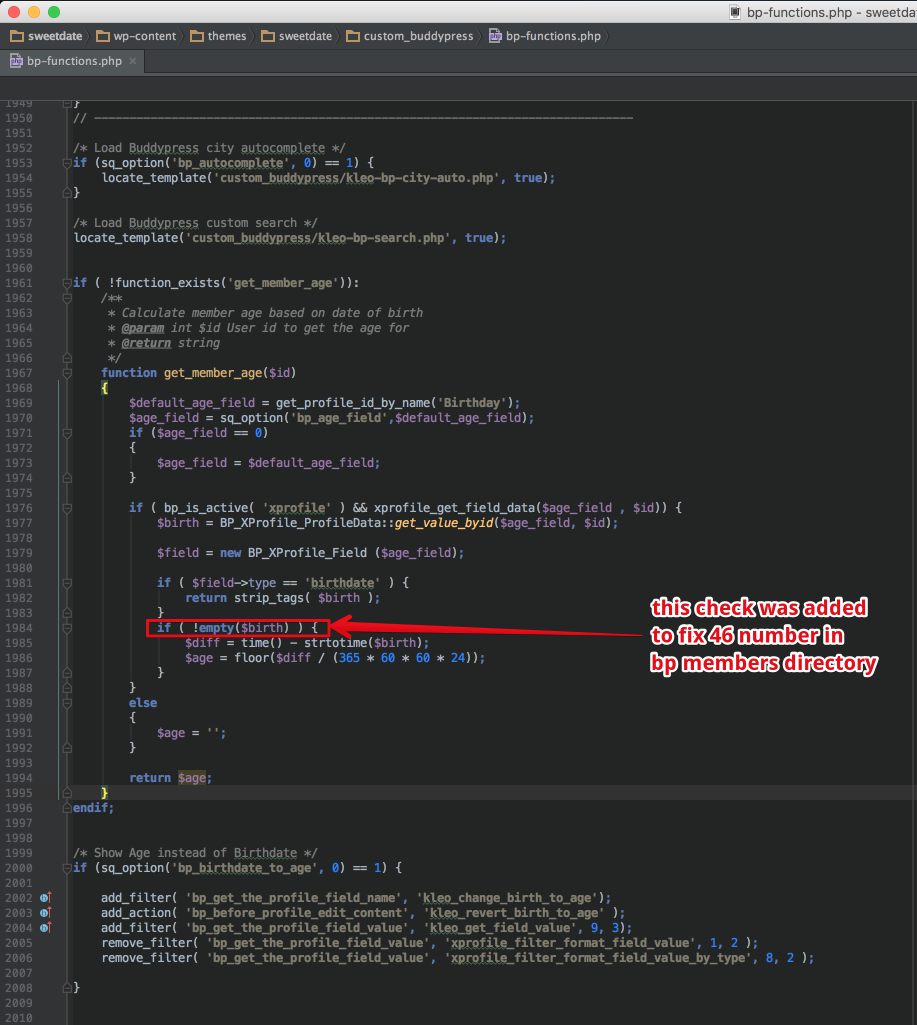
Cheers
R.Hi there!!! Help others from the community and mark any reply as solution if it solved your question. Mark as a solutionNovember 30, 2016 at 15:56 in reply to: Can we make different buddypress group with a paying subscription #145678ModeratorNo problem
Cheers
RHi there!!! Help others from the community and mark any reply as solution if it solved your question. Mark as a solutionNovember 30, 2016 at 15:53 in reply to: ERROR: drag & drop the images to rearrange the order #145676ModeratorNot marked as solutionModeratorHi,
For changing the wp login url you will have to use this kind of plugin : https://wordpress.org/plugins/custom-login-url/
The membership restriction panel it’s located under Wp-admin -> Theme Options -> Memberships
Cheers
R.Hi there!!! Help others from the community and mark any reply as solution if it solved your question. Mark as a solution -
AuthorPosts