

Forum Replies Created
-
Author
-
Radu
ModeratorOk
Have a nice week
Cheers
R.Hi there!!! Help others from the community and mark any reply as solution if it solved your question. Mark as a solutionModeratorHi,
This is a normal behaviour, this is not the ajax search works, in future we will improve this feature.
Cheers
R.Hi there!!! Help others from the community and mark any reply as solution if it solved your question. Mark as a solutionModeratorHi,
We are using this snippet
COPY CODE/ WP SEO / /** * Fix wpseo title */ if ( function_exists( 'bp_is_active' ) ) { add_filter('wpseo_title', 'kleo_bp_wpseo_title'); } function kleo_bp_wpseo_title($title) { global $bp; if (bp_is_user()) { $title = bp_get_displayed_user_fullname() . ' | ' . ucfirst($bp->current_component); } elseif (bp_is_group()) { $title = bp_get_current_group_name() . ' | ' . get_bloginfo('name'); } return $title; //. ' ' . $separator . ' ' . get_bloginfo() }Let me know if will fix the issue.
Cheers
R.Hi there!!! Help others from the community and mark any reply as solution if it solved your question. Mark as a solutionModeratorHi again,
I mean to just simply save theme options.
try to load this css it should force set the icon favorite… for the activity items
COPY CODE#buddypress a.button.fav:before, #buddypress a.button.unfav:before, #buddypress a.fav.bp-secondary-action:before, #buddypress a.unfav.bp-secondary-action:before { content:"\e98d"; }If it’s displays another icon find the content code form fontello.css or fontello-codes.css file
Cheers
R.Hi there!!! Help others from the community and mark any reply as solution if it solved your question. Mark as a solutionModeratorHi, Try this solution : Add this css to wp-admin -> theme options -> general settings -> quick css.page-id-2766 div#main-container.container { max-width: none !important; }The container will be full width only in that page Cheers R.ModeratorNo problem
Cheers
R.Hi there!!! Help others from the community and mark any reply as solution if it solved your question. Mark as a solutionModeratorHi
Regarding the post-social-share.php file, yes copy it to child and edit it.
We will test the language file, thanks you !
Cheers
R.Hi there!!! Help others from the community and mark any reply as solution if it solved your question. Mark as a solutionModeratorI see, do you have any redirection plugin ? Anyway try to do this after you de-activate all plugins excluding buddypress and re-save permalinks.
Let me know
Cheers
R.Hi there!!! Help others from the community and mark any reply as solution if it solved your question. Mark as a solutionModeratorHi,
I’m able to see the menu when i access thru a mobile device, purge empty your phone caches.
Cheers
R.Hi there!!! Help others from the community and mark any reply as solution if it solved your question. Mark as a solutionModeratorHi,
I’m able to see the menu when i access thru a mobile device, purge empty your phone caches.
Cheers
R.Hi there!!! Help others from the community and mark any reply as solution if it solved your question. Mark as a solutionModeratorHi,
Yes, what you need to change ? provide screenshot with an arrow to can figure out exactly.
Cheers
R.Hi there!!! Help others from the community and mark any reply as solution if it solved your question. Mark as a solutionModeratorHi,
Please check in backend ( Wp-admin -> appearance -> menus -> primary menu -> Me item -> verify if the megamenu is checked if is uncheck it)
Let me know
Cheers
R.Hi there!!! Help others from the community and mark any reply as solution if it solved your question. Mark as a solutionModeratorHi,
A possible cause can be : because you have only related article, write more articles in same category and check again.
Cheers
R.Hi there!!! Help others from the community and mark any reply as solution if it solved your question. Ticket solutionAugust 10, 2016 at 19:31 in reply to: Historical comments dissapear when option to add new comments closed #131946ModeratorHi,
I see that, it seems to be a bug, please wait 1-2 days until we investigate and we fix this, we will provide you temporary fix until the next update.
Cheers
R.Hi there!!! Help others from the community and mark any reply as solution if it solved your question. Mark as a solutionModeratorHi,
There should be made an plugins integrations between buddypress and seo by yoast.
I found this maybe it will helps you with other stuff : https://buddydev.com/buddypress/making-wordpress-seo-plugin-compatible-with-buddypress-part-2/
Anyway i will add this idea to our improovment list we don’t have a quick solution to this.
Cheers
R.Hi there!!! Help others from the community and mark any reply as solution if it solved your question. Mark as a solutionModeratorHi,
Hi,
You can have a ajax search wherever you want using this shortcode in text widget and the search form will be rendered there.
Mentioning the context you can select in what type you search
[kleo_search_form]
[kleo_search_form context="members,groups,post,page,forum,product,portfolio"]for search in forums you can use [kleo_search_form context="forum"] using default shortcode [kleo_search_form] will search in all available types.
You can add this on any page or sidebar that you need
Cheers
R.Hi there!!! Help others from the community and mark any reply as solution if it solved your question. Mark as a solutionModeratorOk,
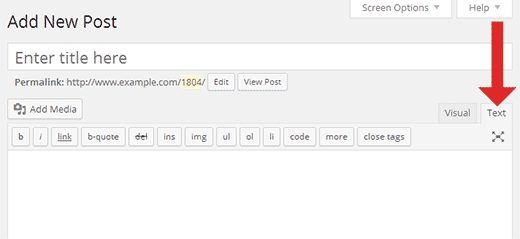
The idea is : when you paste shortcode you should to paste that code from text area not from visual, maybe this was the cause.
Cheers
R.Hi there!!! Help others from the community and mark any reply as solution if it solved your question. Mark as a solutionModeratorNo problem
Cheers
R.Hi there!!! Help others from the community and mark any reply as solution if it solved your question. Mark as a solutionModeratorIf you are interested to use only original uploaded photos not resized, not it’s ok if you comment those, do some test after that.
Very good article maybe you will need it : https://paulund.co.uk/remove-default-wordpress-image-sizes
Cheers
R.Hi there!!! Help others from the community and mark any reply as solution if it solved your question. Mark as a solutionModeratorHi,
1. You’re welcome
2. ODD, Try to re-save theme options….. if not works tell me what you have done you have only added icons or you have removed and added on fontello.com, try to do this again only adding another icons not removing.
Cheers
R.Hi there!!! Help others from the community and mark any reply as solution if it solved your question. Mark as a solutionModeratorMost probably yes, after you do any change to website structure empty purge the cache.
Cheers
R.Hi there!!! Help others from the community and mark any reply as solution if it solved your question. Ticket solutionModeratorHi, The photos behaviour it's like that because after refresh the photos are placed into a carousel... the page should be refreshed to can generate the carousel... i don't have a quick solution for this. Cheers R.ModeratorYou’re very welcome.
If you are pleased with the support service please very much to leave a short review … few words about your experience with the support service.
https://themeforest.net/item/kleo-next-level-wordpress-theme/reviews/6776630
Thank you in advance
Cheers
R.Hi there!!! Help others from the community and mark any reply as solution if it solved your question. Mark as a solutionAugust 10, 2016 at 18:24 in reply to: How to make the footer stuck to the bottom (even on short pages)? #131926ModeratorHi,
This is not possible without having content there, or empty…. spaces….
Just add some BR tags or spaces..
Cheers
R.Hi there!!! Help others from the community and mark any reply as solution if it solved your question. Mark as a solutionModeratorHi,
I see that i’m able to click on register and it goes me here : http://104.155.16.174/bliv-bruger-paa-siden/ it seems to be original register page, do you have solved the issue ?
Cheers
R.Hi there!!! Help others from the community and mark any reply as solution if it solved your question. Mark as a solutionModeratorYes, that’s because it was designed to work in main menu not in top menu, in normal position this search are expanded when you are on mobile… and for adapting for what you need it requires dedicated time… i hope you understand.
Cheers
R.Hi there!!! Help others from the community and mark any reply as solution if it solved your question. Mark as a solutionModeratorHi,
Accessing forums and groups pages and displaying the all groups and all available forums it’s a normal behaviour you can compare the behavior on the theme demo.
The groups that you belongs and also the forums will be shown only in the tabs from your buddypress profile.
Link example : http://localhost/members/admin/groups/
Cheers
R.Hi there!!! Help others from the community and mark any reply as solution if it solved your question. Mark as a solutionModeratorSorry, i’ve forgot to respond to you for the faq module question.
You can use accordions and tabs elements from visual composer to achieve something similar or you can search in wordpress repository for a faq module.
Cheers
R.Hi there!!! Help others from the community and mark any reply as solution if it solved your question. Mark as a solutionModeratorHi,
The This field can be seen by it’s part of buddypress if you already translated this and the translation it not applies can be possible the po/mo files to be in wrong path.
The default language files it’s located here : /wp-content/languages/plugins
Details here : https://buddypress.org/support/topic/where-is-the-translation-file/#post-236750
The lang files should named like this buddypress-EN_en.po/mo
For the default avatar problem try to use this function instead : http://wordpress.stackexchange.com/a/66050
In child theme elusive-icons.php and lib\options.php cannot be overwritten. Only post-social-share.php in your case.
Cheers
R.Hi there!!! Help others from the community and mark any reply as solution if it solved your question. Mark as a solutionAugust 10, 2016 at 17:34 in reply to: Change login-position in mobile version / Unwanted space in mobile version #131914ModeratorHi,
I don’t think so, in the addon description says that it gives you ability to have the pp express as second option. so if you will choose directly paypal express as main i think it will be ok, test it !
Regarding the #131294 ticket, i’ve read the next ticket that all are fine, i taught that those are ok but i will respond you now.
1. Try with this css to hide the form in activation page.
COPY CODE.activate .form-header ,.activate .form-search , .activate .form-footer {display:none !important; }2. I think the bg image it’s removed on mobile because it’s not enough space, but anyway about what image are you talking about ? give screenshot and if you provide example links of your website provide the password to can see it.
3. Where i can see this live ? with the css that you have provided i cannot see that border green, it seems that it’s not controlled by this css.
R.
Hi there!!! Help others from the community and mark any reply as solution if it solved your question. Mark as a solutionModeratorHi, First follow this article to understand how you can load your desired fontello icon to the theme : https://archived.seventhqueen.com/kleo/article/use-custom-fontello-icons-kleo-theme in this way you will add your extra icon that will use there. Second you should add that code : http://pastebin.com/S4RYMJF7 in child theme functions.php ( wp-content/themes/kleo-child/functions.php ) but before pasting you should replace put-your-icon-class-here with twitch icon code from example : icon-twitch And that's all Cheers R. -
AuthorPosts