

Forum Replies Created
-
Author
-
Radu
ModeratorHi,
For that you should add this file after unzip (see attached) to kleo child theme in this location (/wp-content/themes/kleo-child/page-parts/general-header-section.php)
Then in kleo child style.css you will have to add the next CSS codeCOPY CODEul#menu-kleotopmenu .menu-item-has-children ul.dropdown-menu.sub-menu li ul { left: 158px !important; } @media(max-width:991px) { ul#menu-kleotopmenu .menu-item-has-children ul.dropdown-menu.sub-menu li ul { left:-158px !important; } }NOTE: KLEO child theme needs to be installed and activated
I will add this to the improvements list.
Cheers
R.Hi there!!! Help others from the community and mark any reply as solution if it solved your question. Mark as a solutionModeratorHi,
You’re welcome
Cheers
R.Hi there!!! Help others from the community and mark any reply as solution if it solved your question. Mark as a solutionModeratorOk then
Cheers
R.Hi there!!! Help others from the community and mark any reply as solution if it solved your question. Mark as a solutionModeratorHi,
Normally this folder and files shouldn’t be there, in official Kleo theme pack you don’t have that in child theme.
Thank you too!Merry Christmas
R.Hi there!!! Help others from the community and mark any reply as solution if it solved your question. Mark as a solutionDecember 27, 2016 at 13:16 in reply to: How make secondary menu show up underneath main menu #148063ModeratorHi,
You can use the next CSS to can have the secondary menu under the primary, this may have’s some bugs since the theme wasn’t conceived to work with the menus like that.
COPY CODE.header-flexmenu #header .kleo-main-header>.container { flex-wrap:wrap; justify-content: flex-end; align-items: flex-start; width: 100%; } .kleo-main-header.header-normal .navbar-header{ background: #cacaca; width: 30%; height: 100%; } .kleo-main-header.header-normal .navbar-collapse { background: pink; width: 70%; } .kleo-main-header.header-normal>.container .secondary-menu { background: green; width: 70%; transform: translateY(-50%); } @media (min-width: 991px) .kleo-main-header .nav.navbar-nav { max-height: 44px; }The Css will be added to wp-admin -> theme options -> general settings -> quick css
Cheers
R.Hi there!!! Help others from the community and mark any reply as solution if it solved your question. Mark as a solutionModeratorHi,
The admin credentials aren’t working, can you check please ?
Cheers
R.Hi there!!! Help others from the community and mark any reply as solution if it solved your question. Mark as a solutionModeratorHi,
IF that code doesn’t work on BuddyPress widgets ask this on BuddyPress forums since we not change the logic of BuddyPress widgets.
Cheers
R.Hi there!!! Help others from the community and mark any reply as solution if it solved your question. Mark as a solutionModeratorHi,
We can help you to configure the theme as in the demo for the any other theme related things you can ask here on the forum, if you need advanced consultancy and assistance for your project you can send us an email to can give you a quote for this operation at this address dev@seventhqueen.com
Cheers
R.Hi there!!! Help others from the community and mark any reply as solution if it solved your question. Mark as a solutionModeratorHi,
Please try to do that using this plugin : https://wordpress.org/plugins/user-meta/
Cheers
R.Hi there!!! Help others from the community and mark any reply as solution if it solved your question. Mark as a solutionModeratorHi Jeff,
I’ve found, the problem it’s caused by the files from this folder
PATH: /wp-content/themes/kleo-child/BuddyPress/css located in your child theme, I renamed the folder to old_css in this way the CSS files from that folder will not be loaded into the Kleo theme.Have a nice weekend Jeff and Merry Christmass!
Regards
R.Hi there!!! Help others from the community and mark any reply as solution if it solved your question. Mark as a solutionModeratorI see, in this case most probably if you will put 0 value in notification settings this will not be disabled and yours should put a higher value like 15 minutes but converted to milliseconds in this way the notification check for each user will be made once at 15 minutes or depends by the value that you put there.
Cheers
RHi there!!! Help others from the community and mark any reply as solution if it solved your question. Mark as a solutionModeratorWhat’s your current version? anyways put a higher value like 80,90 or 300 seconds time between notifications check.
I recommend you to increase the value until you update the KLEO theme to latest version.
Cheers
R.Hi there!!! Help others from the community and mark any reply as solution if it solved your question. Mark as a solutionModeratorHi @annamason
In the past we had a bug about this kleo_bp_notifications_refresh action but now it’s solved the problem was 0 value wasn’t applies in theme options, using 0 value you can de-activate the notifications refresh.
If you have so many active members I recommend you to change the refresh interval from 20 seconds ( 20000 ) to a higher value like 80 seconds ( 80000 )
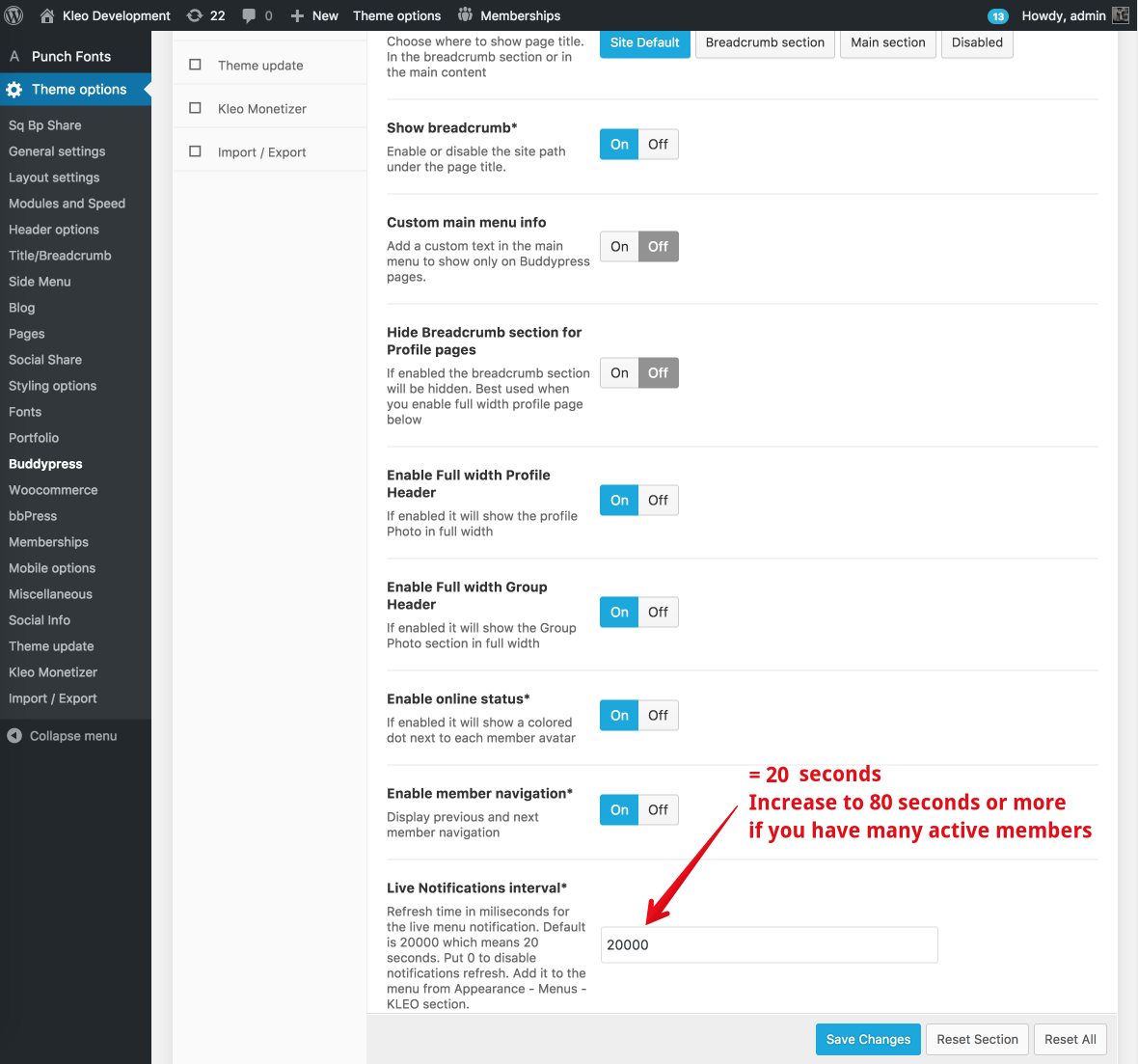
The change can be made from wp-admin -> theme options -> buddypress
Cheers
R.Hi there!!! Help others from the community and mark any reply as solution if it solved your question. Mark as a solutionDecember 22, 2016 at 18:36 in reply to: How create, edit, and add elements to a new Sidebar? #147815ModeratorHi,
The new created sidebar should appear on wp-admin -> apperance -> widgets
Let me know
Cheers
R.Hi there!!! Help others from the community and mark any reply as solution if it solved your question. Mark as a solutionModeratorHi,
I see, try to do the following and after each operation check if this it’s solved.
Let me knowDo you have the latest version of WordPress ? If not update those
Do you have the latest version of Kleo theme ? If not update those
Do you have the latest version of plugins installed ? If not update those
If you de-activate all plugins it works ? if yes enable back plugins one by one to identify what causes this.
If you de-activate the child theme it works ?
If you switch to default WordPress theme it works ?
Cheers
R.Hi there!!! Help others from the community and mark any reply as solution if it solved your question. Mark as a solutionModeratorJust de-activate the smooth scroll plugin to test it should work normally
Cheers
R.Hi there!!! Help others from the community and mark any reply as solution if it solved your question. Mark as a solutionModeratorHi,
I’m unable to login to your dashboard because it says wrong user or pass,
There you are using a recent post widget?
Can you please provide FTP details also to can test the solution live ?
Cheers
R.Hi there!!! Help others from the community and mark any reply as solution if it solved your question. Mark as a solutionModeratorHi,
I cannot reproduce this issue on my local install please follow the next advice, most probably this it’s caused by some plugin that changes the woocommerce logic or by the child theme
Hi,
Do you have the latest version of WordPress ? If not update those
Do you have the latest version of Kleo theme ? If not update those
Do you have the latest version of plugins installed ? If not update those
If you de-activate all plugins it works ? if yes enable back plugins one by one to identify what causes this.
If you de-activate the child theme it works ?
If you switch to default WordPress theme it works ?
Cheers
R.Hi there!!! Help others from the community and mark any reply as solution if it solved your question. Mark as a solutionModeratorPlease taka e look i’ve replaced the code from your quick css area with this
COPY CODE.activity-inner iframe { width: 100% !important; height: 100% !important; min-height: 460px; }Cheers
R.Hi there!!! Help others from the community and mark any reply as solution if it solved your question. Mark as a solutionModeratorHi,
You’re welcome
Have a nice week
Cheers
R.Hi there!!! Help others from the community and mark any reply as solution if it solved your question. Mark as a solutionModeratorHi,
You can install the theme on a subdomain temporary or test something, but if you will use this continuous you should buy a new license for the subdomain install.
The theme installation contains only theme install + demo content import + basic setup plugins and theme and the installation cannot include what you need, for that you can get a separate price quote.
My advice’s to keep the same database by duplicating it and use it in your new subdomain in that way you will keep the settings.
Cheers
RHi there!!! Help others from the community and mark any reply as solution if it solved your question. Mark as a solutionModeratorHi,
I, we can help you to solve the slider issue, but if you don’t want that follow the refund procedure.
you can request a refund here https://themeforest.net/refund_requests/new
Also please provide a reason since you now got the theme and a refund should have strong reasons
Cheers
R.Hi there!!! Help others from the community and mark any reply as solution if it solved your question. Mark as a solutionModeratorHi,
I’ve noticed that the cover photo does not work because the child theme, give a try by changing theme to parent and check, you can identify the problematic php file from the child by renaming it by prefixing by 123 from example also you can do the same by commenting the actions or/and functions.
Cheers
R.Hi there!!! Help others from the community and mark any reply as solution if it solved your question. Mark as a solutionModeratorHi,
New tickets can be opened from our navigation bar GET SUPPORT -> KLEO -> scroll down -> OPEN A NEW TICKET.
So this issue : members don’t show up in the members list, it’s solved?
Cheers
R.Hi there!!! Help others from the community and mark any reply as solution if it solved your question. Mark as a solutionModeratorHi,
In the first instance, you should change the strings using translation method!
This will allow you to change strings easily using LOCO Translate plugin, I will paste the procedure below.
Theme strings and plugins strings can easily be changed by using Loco Translate plugin https://wordpress.org/plugins/loco-translate/
A small introduction on how translations work
Translatable strings can come from the theme or from the installed plugins. You need to translate the theme or the plugin depending on what section of the site your string is found.
For example, if your string is on your BuddyPress profile then most probably you will need to translate BuddyPress plugin. If you are on the Forums section of your site then bbPress plugin should be the one that needs to be translated. Another example is the rtMedia plugin that adds the Media links to BuddyPress and if you want to translate it then this plugin will contain the string.
Follow these steps to get you started:
- Install Loco Translate plugin
- Go to the plugin dashboard: WP Admin – Tools – Manage translations
- Find the theme or plugin in the list.
- If the language isn’t already in the list then click Add new language, choose your language and if you are asked where you want to save the language files choose global language directory ( wp-content/languages/ ).
- Press SYNC button to synchronise your translation with the provided .pot file
- Search for the string you want to translate and add your translated string.
- Press Save when you finished your translation.
Note: You will have to set the language for your blog from WP-admin – Settings – General – Site Language – Choose your language
Let me know
Cheers
R.Hi there!!! Help others from the community and mark any reply as solution if it solved your question. Mark as a solutionModeratorHi,
Can you please provide admin credentials to can take a look please ?
Please provide them in a private reply.
Cheers
R.Hi there!!! Help others from the community and mark any reply as solution if it solved your question. Mark as a solutionModeratorHi,
This is how i see that on retina resolution

I cannot notice a design problemThis is now it looks in the iphone

Try to empty the cache on your iphone or try from a incognito window
Cheers
R.Hi there!!! Help others from the community and mark any reply as solution if it solved your question. Mark as a solutionModeratorHi,
I think it’s something related how you register the post type and make sure the url for the archive doesn’t conflict with any other existing page slugs. Other then that you can create a single-reto.php for a retro post type and it should follow the template when accessing the single custom post type page.
The link you shared ( https://archived.seventhqueen.com/forums/topic/cpt/ ) it just add the theme specific metaboxes post type not registering it.
You can register new post type usign this plugin : https://generatewp.com/post-type/ then if you want to have all theme options for that new CPT you should follow this topic https://archived.seventhqueen.com/forums/topic/cpt/
Cheers
R.Hi there!!! Help others from the community and mark any reply as solution if it solved your question. Mark as a solutionModeratorHi,
Here’s the CSS
COPY CODE.members .item-list-tabs { display: inline-block; vertical-align: middle; } .members #subnav ul { padding: 0; margin: 0; }Cheers
R.Hi there!!! Help others from the community and mark any reply as solution if it solved your question. Ticket solution -
AuthorPosts