

Forum Replies Created
-
Author
-
Radu
ModeratorIf you have any cache plugin, empty all caches.
There are the files… but you know how to handle php and html codes
Cheers
R.Hi there!!! Help others from the community and mark any reply as solution if it solved your question. Mark as a solutionModeratorPlease provide a screenshot to can figure out what about icon are you talking..
Cheers
R.Hi there!!! Help others from the community and mark any reply as solution if it solved your question. Mark as a solutionModeratorHi,
The bug list it’s available only for us.
Nope we don’t have a list with upcoming releases.
Cheers
R.Hi there!!! Help others from the community and mark any reply as solution if it solved your question. Mark as a solutionModeratorGreat
Have a nice week
Cheers
R.Hi there!!! Help others from the community and mark any reply as solution if it solved your question. Mark as a solutionModeratorNo problem
Cheers
R.Hi there!!! Help others from the community and mark any reply as solution if it solved your question. Mark as a solutionModeratorOr you can use a text block and in text area put this tag
COPY CODE<hr>Cheers
R.Hi there!!! Help others from the community and mark any reply as solution if it solved your question. Mark as a solutionModeratorHi,
Please follow the next procedure to enable wp debug then re-save again theme options to see what error it shows.
Steps to enable wp debug:
- Connect to your server by FTP
- Look in root directory of your WordPress install and open wp-config.php
- Search for define( ‘WP_DEBUG’, false ); and change FALSE value to TRUE
COPY CODEdefine( 'WP_DEBUG', true );- After this line add this:
COPY CODEdefine( 'WP_DEBUG_LOG', true );WP_DEBUG_LOG is a companion to WP_DEBUG that causes all errors to also be saved to a debug.log log file inside the /wp-content/ directory. This is useful if you want to review all notices later or need to view notices generated off-screen (e.g. during an AJAX request or wp-cron run).
Repeat the described actions and then check the debug.log file and let me know what error appears.
Let me know
Cheers
Hi there!!! Help others from the community and mark any reply as solution if it solved your question. Mark as a solutionModeratorWhy don’t you use a gap… with a border top or bottom with 1 px value ?
Cheers
R.Hi there!!! Help others from the community and mark any reply as solution if it solved your question. Mark as a solutionModeratorHi,
The support it’s available only here, problem solved, you have placed a space in a slug which is not ok at all

Done now
Cheers
R.Hi there!!! Help others from the community and mark any reply as solution if it solved your question. Ticket solutionModeratorHi,
1. Yes via CSS with this CSS
COPY CODE.kleo-mobile-switch { display: none !important; }2. Follow this article : https://archived.seventhqueen.com/general/article/create-facebook-app-get-app-id-facebook-login
3. Use this plugin : https://wordpress.org/plugins/remove-dashboard-access-for-non-admins/
4. Shortcodes list : https://archived.seventhqueen.com/documentation/kleo#shortcodes
5. Our shortcodes are generated by K-elements and if you de-activate the visual composer our shortcodes will run, so.. you can generate the shortcodes with visual composer then copy the code and paste it to text area from your builder.
Cheers
R.Hi there!!! Help others from the community and mark any reply as solution if it solved your question. Mark as a solutionModeratorHi,
Theme strings and plugins strings can easily be changed by using Loco Translate plugin https://wordpress.org/plugins/loco-translate/
A small introduction on how translations work
Translatable strings can come from the theme or from the installed plugins. You need to translate the theme or the plugin depending on what section of the site your string is found.
For example if your string is on your BuddyPress profile then most probably you will need to translate BuddyPress plugin. If you are on the Forums section of your site then bbPress plugin should be the one that needs to be translated. Another example is the rtMedia plugin that adds the Media links to BuddyPress and if you want to translate it then this plugin will contain the string.
Follow these steps to get you started:
- Install Loco Translate plugin
- Go to the plugin dashboard: WP Admin – Tools – Manage translations
- Find the theme or plugin in the list.
- If the language isn’t already in the list then click Add new language, choose your language and if you are asked where you want to save the language files choose global language directory ( wp-content/languages/ ).
- Press SYNC button to synchronise your translation with the provided .pot file
- Search for the string you want to translate and add your translated string.
- Press Save when you finished your translation.
Note: You will have to set the language for your blog from WP-admin – Settings – General – Site Language – Choose your language
Cheers
R.Hi there!!! Help others from the community and mark any reply as solution if it solved your question. Mark as a solutionModeratorHi,
Take a look at this small guide : https://drive.google.com/file/d/0Bxo5b6iHWRMwR0xyTElIUVNkcHc/view
Cheers
R.Hi there!!! Help others from the community and mark any reply as solution if it solved your question. Mark as a solutionAugust 30, 2016 at 18:50 in reply to: How can i have this login page or similar with different background? #134315ModeratorHi,
I think the login page it’s missing and you should create a page named login from wp-admin -> pages-> add new then go to wp-admin -> appearance -> theme options -> Redirect to login page -> choose login page, then in the Pages exceptions field you should select those pages : Login,Activate and Register and… your additional pages if you have
Cheers
R.Hi there!!! Help others from the community and mark any reply as solution if it solved your question. Mark as a solutionModeratorHi,
I’ve used this shortcode with no icon…
[vc_row][vc_column][kleo_divider icon="0"][/vc_column][/vc_row]
and it generated this :
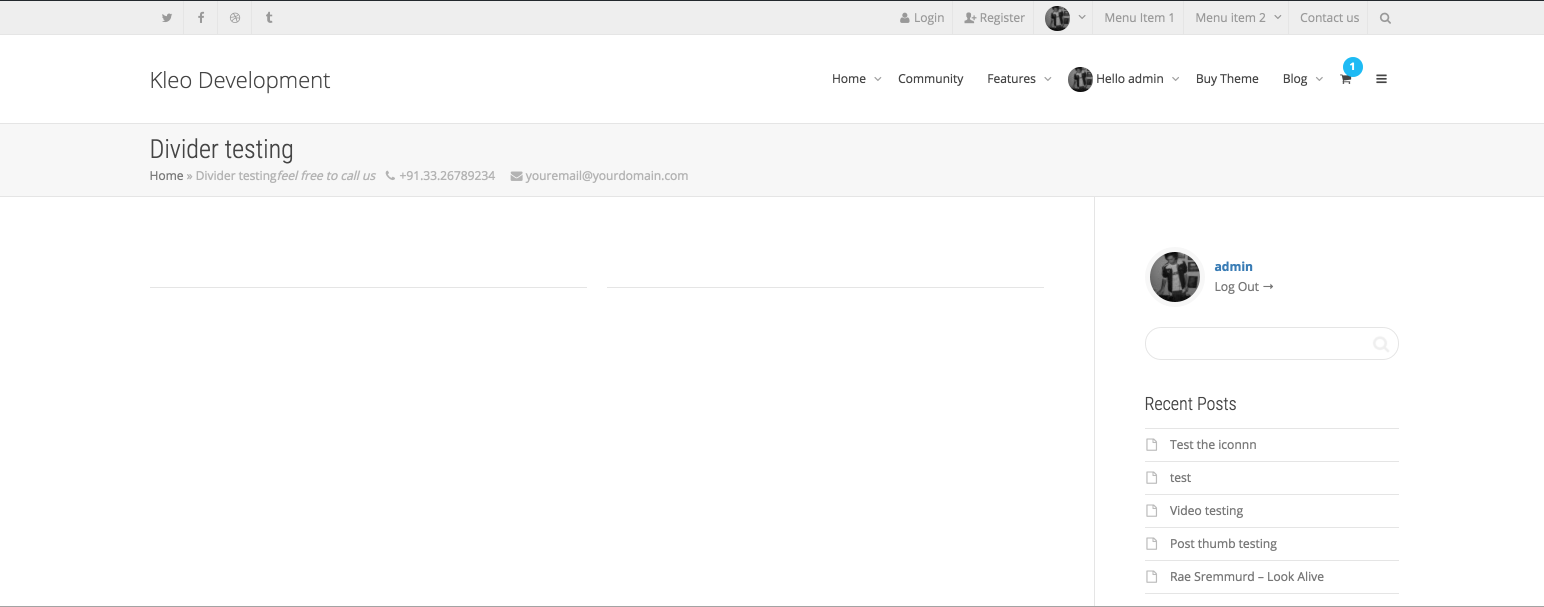
So, there is no problem with the latest version of KLEO+WP+VC+KElements, please de-activate child theme and rest of the plugins except those KLEO+WP+VC+KElements
Cheers
R.Hi there!!! Help others from the community and mark any reply as solution if it solved your question. Mark as a solutionModeratorHi,
Regarding the import problems check this please : https://archived.seventhqueen.com/kleo/article/facing-problems-importing-demo-content these settings should be increased to can perform demo import.
Your register forum don’t displays the fields because i think you have BuddyPress plugin uninstalled or de-activated also check this setting please check : Wp-admin -> settings -> general -> anyone can register -> check it.
For a better debugging process you should follow the next procedure to find out what error you encounter when you import data.
Steps to enable wp debug:
- Connect to your server by FTP
- Look in root directory of your WordPress install and open wp-config.php
- Search for define( ‘WP_DEBUG’, false ); and change FALSE value to TRUE
COPY CODEdefine( 'WP_DEBUG', true );- After this line add this:
COPY CODEdefine( 'WP_DEBUG_LOG', true );WP_DEBUG_LOG is a companion to WP_DEBUG that causes all errors to also be saved to a debug.log log file inside the /wp-content/ directory. This is useful if you want to review all notices later or need to view notices generated off-screen (e.g. during an AJAX request or wp-cron run).
Repeat the described actions and then check the debug.log file and let me know what error appears.
Cheers
Hi there!!! Help others from the community and mark any reply as solution if it solved your question. Mark as a solutionModeratorHi,
If you are not able to change that via PHP files you should to contact the hosting support and ask them to change the value for you
Cheers
R.Hi there!!! Help others from the community and mark any reply as solution if it solved your question. Mark as a solutionModeratorHi,
We already know about this, we have scheduled to investigate this at the end of the week or on the start of a next week
Cheers
R.Hi there!!! Help others from the community and mark any reply as solution if it solved your question. Mark as a solutionModeratorHi,
I don’t think there is a theme problem and I think the issue it’s caused by some plugin or by minifying or cache, so please purge empty all caches, de-activate minifying for all resources also the cache, then de-activate rest of the plugins except BuddyPress and try to reproduce that bug and let me know
Try also with the child theme de-activated if you using it.
Cheers
R.Hi there!!! Help others from the community and mark any reply as solution if it solved your question. Mark as a solutionModeratorHi,
There are the CSS selectors that control content area and sidebar area
COPY CODE.template-page.col-sm-9.tpl-right { width: 85% !important; } .sidebar.sidebar-main.col-sm-3.sidebar-right { width: 15% !important; }Change the values or replace it with px values to achieve what you need
The css can added to wp-admin -> theme options -> general settings -> quick css
Cheers
R.Hi there!!! Help others from the community and mark any reply as solution if it solved your question. Ticket solutionModeratorHi,
Try to do next, go to wp-admin -> appearance -> theme options -> development mode -> set ON
Let me know, if this will not works i need admin credentials and page URL.
cheers
R.Hi there!!! Help others from the community and mark any reply as solution if it solved your question. Mark as a solutionModeratorHi,
Yes, but open a ticket after that with URL and admin credentials
Cheers
R.Hi there!!! Help others from the community and mark any reply as solution if it solved your question. Mark as a solutionModeratorGreat
Have a nice week
Cheers
R.Hi there!!! Help others from the community and mark any reply as solution if it solved your question. Mark as a solutionModeratorHi,
I’ve told you to have Visual Composer and K-elements activated but you don’t I don’t understand why… anyways.. go here : http://vps268021.ovh.net/wp-admin/themes.php?page=install-required-plugins and activate Visual Composer and K-elements that are required if you will use pages with visual composer !!!

—

R.
Hi there!!! Help others from the community and mark any reply as solution if it solved your question. Mark as a solutionModeratorHi,
With this css,i’ve already provided in a previews reply
COPY CODE.header-color .top-menu li > a, .header-color #top-social li a { font-family: "Raleway"; }Cheers
R.Hi there!!! Help others from the community and mark any reply as solution if it solved your question. Mark as a solution -
AuthorPosts