

Forum Replies Created
-
Author
-
August 27, 2018 at 14:16 in reply to: Filter “Sweet stories from our Lovers” according WPML language #207612
Radu
ModeratorHi,
I had added this issue to bug list we will get back to you when we will fix it. I don’t have a ETA.
Cheers
RHi there!!! Help others from the community and mark any reply as solution if it solved your question. Mark as a solutionModeratorHi,
Still not understanding fully the scenario with that button sorry can you explain better using screenshots with adnotations and also showing url of the page that you want to add the button.
Cheers
RHi there!!! Help others from the community and mark any reply as solution if it solved your question. Mark as a solutionModeratorHi,
Noticed that this happens only on homepage if i try in any other page that issue not happens, this results that in the homepage content something breaks that not sure what, i recommend you to clone the page and in the cloned one delete sections one by one while you check the page behaviour unntil you find it.
Cheers
RHi there!!! Help others from the community and mark any reply as solution if it solved your question. Mark as a solutionModeratorHi,
If you need to change that logic you can copy this file ( wp-content/themes/kleo/vc_templates/vc_posts_grid.php ) to child theme ( wp-content/themes/kleo-child/vc_templates/vc_posts_grid.php ) and make your desired changes.
Doing changes in the child theme using your custom $args will result the same without using filter or action hook.

Cheers
RHi there!!! Help others from the community and mark any reply as solution if it solved your question. Mark as a solutionModeratorHi,
Please folow the points
1. Check this guide : https://seventhqueen.com/blog/code-snippets/the-definitive-wordpress-speed-guide-step-by-step-easy.html
2 and 3. This is odd, i cannot reproduce that on my local end, can you please let me know if you encounter the same using default wp theme (twenty seventeen) ?
4. Check for plugin recommandations under wp-admin -> appearance -> install plugins.
5. Which questionare ? Are you referring to the register page from buddypress ?
Let me know
Cheers
RHi there!!! Help others from the community and mark any reply as solution if it solved your question. Mark as a solutionModeratorHi,
there are two ways to show the login pop-up
1. Adding at the end of the link /#show-login example : http://rdu.local/kleo/#show-login
COPY CODE<a href="http://rdu.local/kleo/#show-login">Show Login by direct link</a>2. Adding this class kleo-show-login to the element that you want to click and to appear the pop-up.
COPY CODE<a href="http://rdu.local/kleo/" class="kleo-show-login">Show Login by class</a>Cheers
RHi there!!! Help others from the community and mark any reply as solution if it solved your question. Mark as a solutionAugust 22, 2018 at 23:50 in reply to: Filter “Sweet stories from our Lovers” according WPML language #207209ModeratorI will investigate and look for a solution in future, i will let you know
Cheers
RHi there!!! Help others from the community and mark any reply as solution if it solved your question. Mark as a solutionModeratorHi,
At this moment there is no quick solution for this, i need to know if your pagination it’s made through ajax or it reloads entire page when you press 2,3, can you give me a dummy account to can see it ?
Cheers
RHi there!!! Help others from the community and mark any reply as solution if it solved your question. Mark as a solutionModeratorHi,
We will investigate this compat in future, we will let you know
Cheers
RHi there!!! Help others from the community and mark any reply as solution if it solved your question. Mark as a solutionModeratorNo problem
Cheers
RHi there!!! Help others from the community and mark any reply as solution if it solved your question. Mark as a solutionModeratorOk, i will let you know
Cheers
RHi there!!! Help others from the community and mark any reply as solution if it solved your question. Mark as a solutionModeratorHi,
Tried some time to debug that and in last instance i had de-activated our theme and activating twenty seventeen offering the same behaviour so that in meaning that has nothing to do with our theme and the issue may be related to other thing.

I had activated the child theme back.
Try to re-install buddypress plugin, try to leave only buddypress plugin activated and check if works with default theme, if it’s the same it may be a issue from buddypress plugin and you will have to write them a ticket on their support forum.
Cheers
RHi there!!! Help others from the community and mark any reply as solution if it solved your question. Mark as a solutionModeratorHi,
No problem
Cheers
RHi there!!! Help others from the community and mark any reply as solution if it solved your question. Mark as a solutionModeratorHi,
We are using the Visual composer logic for that shortcode and you can inspire from here : https://theme.co/apex/forums/topic/exclude-category-from-recent-posts-in-visual-composer/
Let me know
Cheers
RHi there!!! Help others from the community and mark any reply as solution if it solved your question. Mark as a solutionModeratorHi,
On demo not scrolls it’s ajax pagination : https://seventhqueen.com/demo/sweetdatewp/members/
Did you have any errors in browser console ?
Cheers
RHi there!!! Help others from the community and mark any reply as solution if it solved your question. Mark as a solutionAugust 20, 2018 at 21:11 in reply to: Bug in Multiselect Dropdown compatibility Firefox/Chrome issue #207006ModeratorHi,
Your developer had placed the changes in kleo child theme ? If yes switch the child theme off by activating the Kleo Parent Theme (temporary just to check the how it looks with parent)
If the issue it’s caused by the developer logic code we cannot debug in custom code and you will have to contact it to inform about the cross browser compatibility issue.
Looked at the vertical form on our demo in both browsers and the inputs looks the same https://seventhqueen.com/themes/kleo/get-connected-vertical-form/
Cheers
RHi there!!! Help others from the community and mark any reply as solution if it solved your question. Mark as a solutionModeratorHi,
MAke sure to have membership sign up allowed for your wordpress

Settings → General from your WordPress dashboard, locate the “Membership” section, and check the box next to “Anyone can register”:Cheers
RHi there!!! Help others from the community and mark any reply as solution if it solved your question. Mark as a solutionModeratorHi,
Ok then, sincerely until you i had never heard a similar issue with wpml and sweetdate for activation page, we will investigate in future.
Cheers
RHi there!!! Help others from the community and mark any reply as solution if it solved your question. Mark as a solutionModeratorHi,
No problem,
The Logic for the membership restriction may be located there : wp-content/themes/kleo/lib/plugin-pmpro/config.php the logic it’s inside this function kleo_pmpro_restrict_rules and kleo_pmpro_access_func also the rest stuff are there.
You can overwrite safe the code by copying the code blocks beginning with the below code and pasting it into functions.php in child theme.(see screenshot)
if ( ! function_exists( ‘kleo_pmpro_restrict_rules’ ) )

Cheers
RHi there!!! Help others from the community and mark any reply as solution if it solved your question. Mark as a solutionAugust 20, 2018 at 20:49 in reply to: Filter “Sweet stories from our Lovers” according WPML language #207000ModeratorHi,
I will add this to investigation list and we will do some test and we will get back to you soon with a solution.
Cheers
RHi there!!! Help others from the community and mark any reply as solution if it solved your question. Mark as a solutionModeratorHi,
I was asking for the user buddypress profile, i saw that,i had tried to change the date format of the field taught that interfering in some way, for them moment i have no solution for this issue, i will add this bug list and will be investigated shortly by one of our colleagues until then you can switch the feature off.
At this moment i’m on a vacation and i will get back to the office next week and my response times will be a little delayed, sorry for this.Cheers
R.Hi there!!! Help others from the community and mark any reply as solution if it solved your question. Mark as a solutionModeratorHi,
Our theme has only basics restrictions under wp-admin -> theme options -> memberships for any advance rule for handling and restricting the user you may need a plugins or something addons from pmppro team https://www.paidmembershipspro.com/add-ons/ or for buddypress https://www.paidmembershipspro.com/add-ons/buddypress-integration/ or any other user manager plugin
Cheers
RHi there!!! Help others from the community and mark any reply as solution if it solved your question. Mark as a solutionModeratorIf you encounter the same behavior using default twentyseventen theme it may be a issue from wpml i think… as a workaround you can try:
1. Chose for wp admin dashboard a language
2. Then go to wp-admin -> emails ->
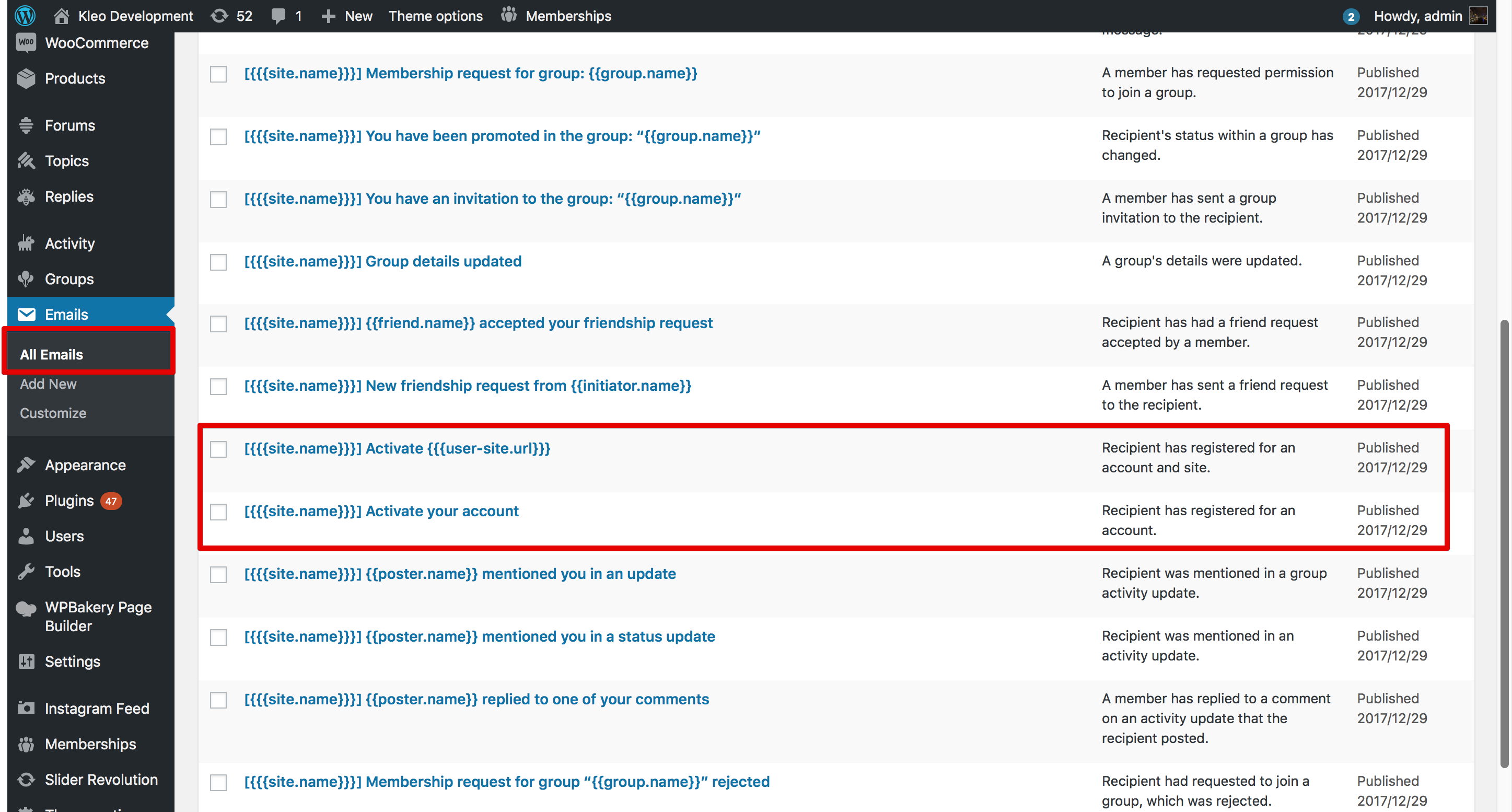
3. Edit the content of the links by adding at the end your lang code
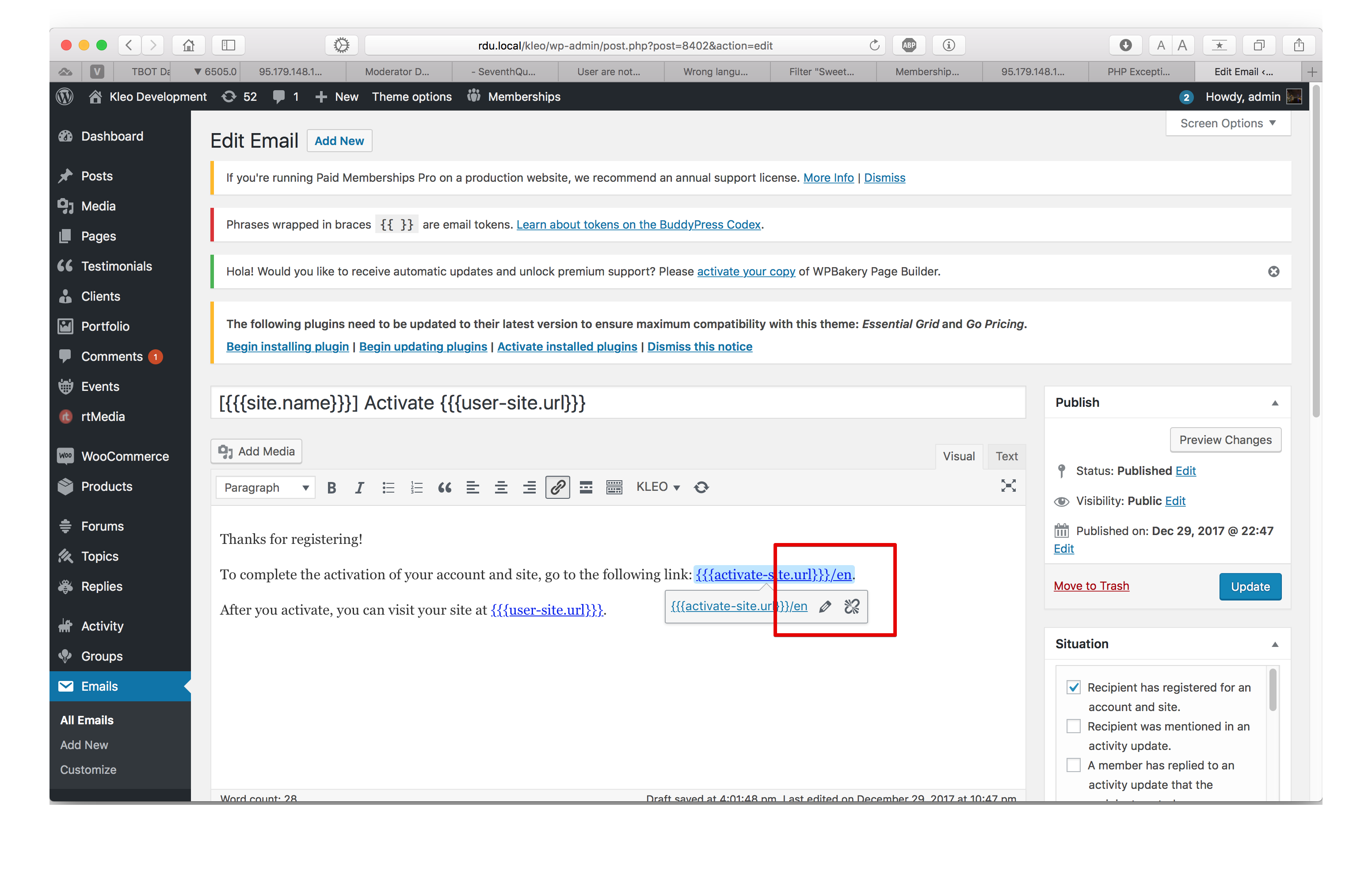
—-
Change wp admin dashboard and repeat for every lang
You can try the wpml team the same meanwhile.
Note:I had not tested this.
Cheers
RHi there!!! Help others from the community and mark any reply as solution if it solved your question. Mark as a solutionModeratorHi,
Ok, how can i help you ?
Cheers
RHi there!!! Help others from the community and mark any reply as solution if it solved your question. Mark as a solutionAugust 17, 2018 at 18:29 in reply to: How can the [kleo_top_members] shortcode be modified to show only members from a specific country? #206717ModeratorNot marked as solutionModeratorHi,
Use the next function for the new users that only register
COPY CODE//!!!!!This function should run only one time. add_action( 'wp_loaded', 'sq_retroactive_user_fix' ); function sq_retroactive_user_fix() { $users = get_users( array( 'fields' => 'ID', 'number' => 2000 ) ); foreach( $users as $user_id ) { // Check to see if the user has activity if ( bp_get_user_last_activity( $user_id ) ) { continue; } // Inactive so lets activate bp_update_user_last_activity( $user_id, bp_core_current_time() ); } // Clean transient cache delete_transient( 'bp_active_member_count' ); } //END !!!!!This function should run only one time.This function should run only one time.
Cheers
RHi there!!! Help others from the community and mark any reply as solution if it solved your question. Mark as a solutionModeratorHi,
There might be a envato server problem, as a workaround you can use the manual update solution : https://archived.seventhqueen.com/kleo/article/updating-the-theme
You can re-try again now the auto update maybe now it works.
Cheers
RHi there!!! Help others from the community and mark any reply as solution if it solved your question. Mark as a solutionAugust 17, 2018 at 16:52 in reply to: Browser complaining about security threat regarding gray_pattern.gif and map-bg.png #206692ModeratorNot marked as solutionModeratorHi,
Maybe you need buddypress wpml plugin ?
Check this : https://wpml.org/documentation/related-projects/buddypress-multilingual/
You can ask the same the wpml team meanwhile the same
Let me know
Cheers
RHi there!!! Help others from the community and mark any reply as solution if it solved your question. Mark as a solution -
AuthorPosts