

Forum Replies Created
-
Author
-
Radu
ModeratorYou’re welcome
Cheers
R.Hi there!!! Help others from the community and mark any reply as solution if it solved your question. Mark as a solutionModeratorHi,
Please follow this link: https://archived.seventhqueen.com/forums/topic/excerpt-lenght-in-wordpress-blog-page/#post-154906
Let me know
Cheers
R.Hi there!!! Help others from the community and mark any reply as solution if it solved your question. Mark as a solutionModeratorHi,
Please add this file after unzip (see attached) to this location : /wp-content/themes/buddyapp-child/buddypress/groups/
Let me know
Cheers
R.Hi there!!! Help others from the community and mark any reply as solution if it solved your question. Mark as a solutionMarch 6, 2017 at 19:42 in reply to: .friend-item { z-index: 9999 !important } style breaks fixed header for widths < 768px #154919ModeratorHi,
Please add this CSS to wp-admin -> theme options -> styling options -> quick css
COPY CODE.friend-item { z-index:1 !important; }Cheers
R.Hi there!!! Help others from the community and mark any reply as solution if it solved your question. Mark as a solutionModeratorHi,
Here it’s the page content shortcode just create new page and paste all code in the text area: http://pastebin.com/raw/cUJq5Mg4
The images will not be included in the code and you should replace the images manually
Cheers
R.
Hi there!!! Help others from the community and mark any reply as solution if it solved your question. Ticket solutionModeratorHi,
1. You should have all updated WP + Theme + Visual composer, you can check for plugin updates from wp-admin -> appearance -> install plugins and you don’t need licence for VC because it’s somehow pre-activated thru our theme.
2. Using a FTP client go to wp-content/plugins/ and delete woocommerce folder, then go to wp-admin -> appearance -> install plugins and install woocommerce again
Cheers
R.Hi there!!! Help others from the community and mark any reply as solution if it solved your question. Mark as a solutionModeratorHi,
Did you encounter same issue using default wp theme ?
Cheers
R.Hi there!!! Help others from the community and mark any reply as solution if it solved your question. Mark as a solutionModeratorHi,
– This is the responsible file for displaying the login pop-up /wp-content/themes/sweetdate/page-parts/general-login-modal.php you will have to copy this file to child theme in same location /wp-content/themes/sweetdate/page-parts/ to can have that even o theme update.
– Paste that code again, I don’t know what you have done there and the support it’s not offered by custom codes only for theme questions and problems.
– All available membership options are under Wp-admin -> Theme Options -> Memberships for any other custom restrictions you should hire a developer to acheive what you need.
– You can load the project in phpstorm or in other php IDE or in a search software that can search thru multiple files for a class or a div, like that you will be able to see what file handle that
Note : Modifying directly in parent theme it’s not recommended because on theme update those will be overwritten
Cheers
R.Hi there!!! Help others from the community and mark any reply as solution if it solved your question. Mark as a solutionMarch 6, 2017 at 17:59 in reply to: [ Solved + Solution ] Excerpt lenght in WordPress blog page #154906ModeratorHi,
Please add the next functions to : http://pastebin.com/raw/SHLbs6Bv
The functions needs to be pasted in wp-content/themes/kleo-child/functions.php
Cheers
R.Hi there!!! Help others from the community and mark any reply as solution if it solved your question. Mark as a solutionModeratorHi,
For me it works I’ve tested before to give you the solution

Make sure to have child theme activated
Cheers
R.Hi there!!! Help others from the community and mark any reply as solution if it solved your question. Ticket solutionMarch 6, 2017 at 17:35 in reply to: Add Media Description field to a grid template for use in Post Masonry Grid #154903ModeratorHi,
Using post masonry grid I’m able to have the attachment excerpt from the caption field.
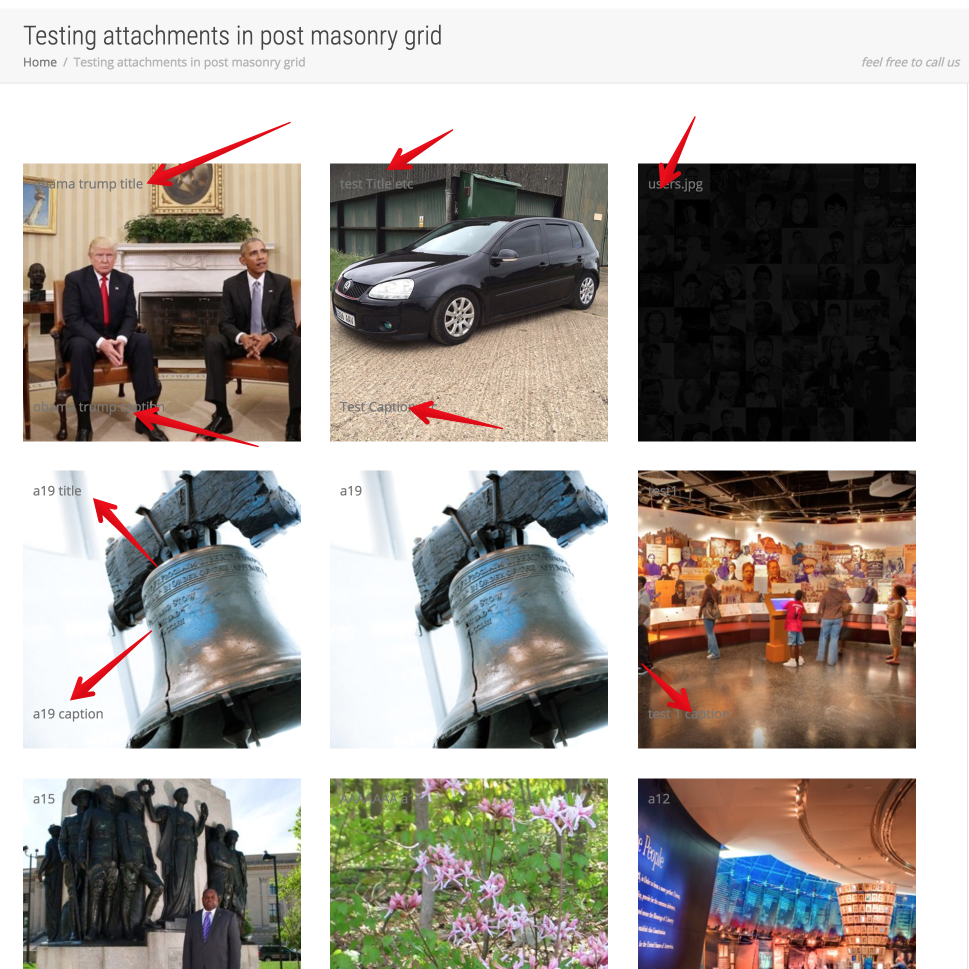
I’ve created a custom Media grid template in that I’ve added title and excerpt
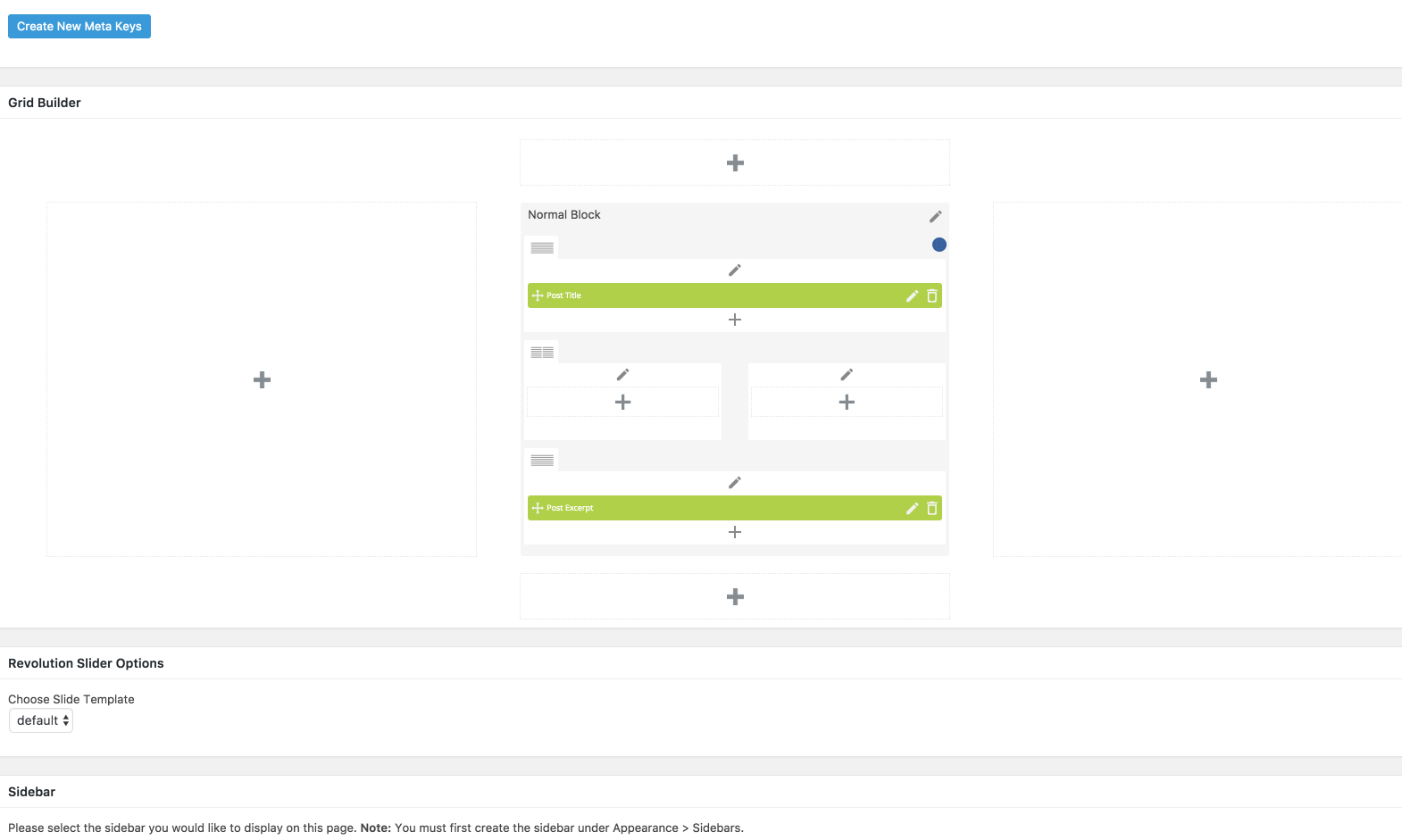
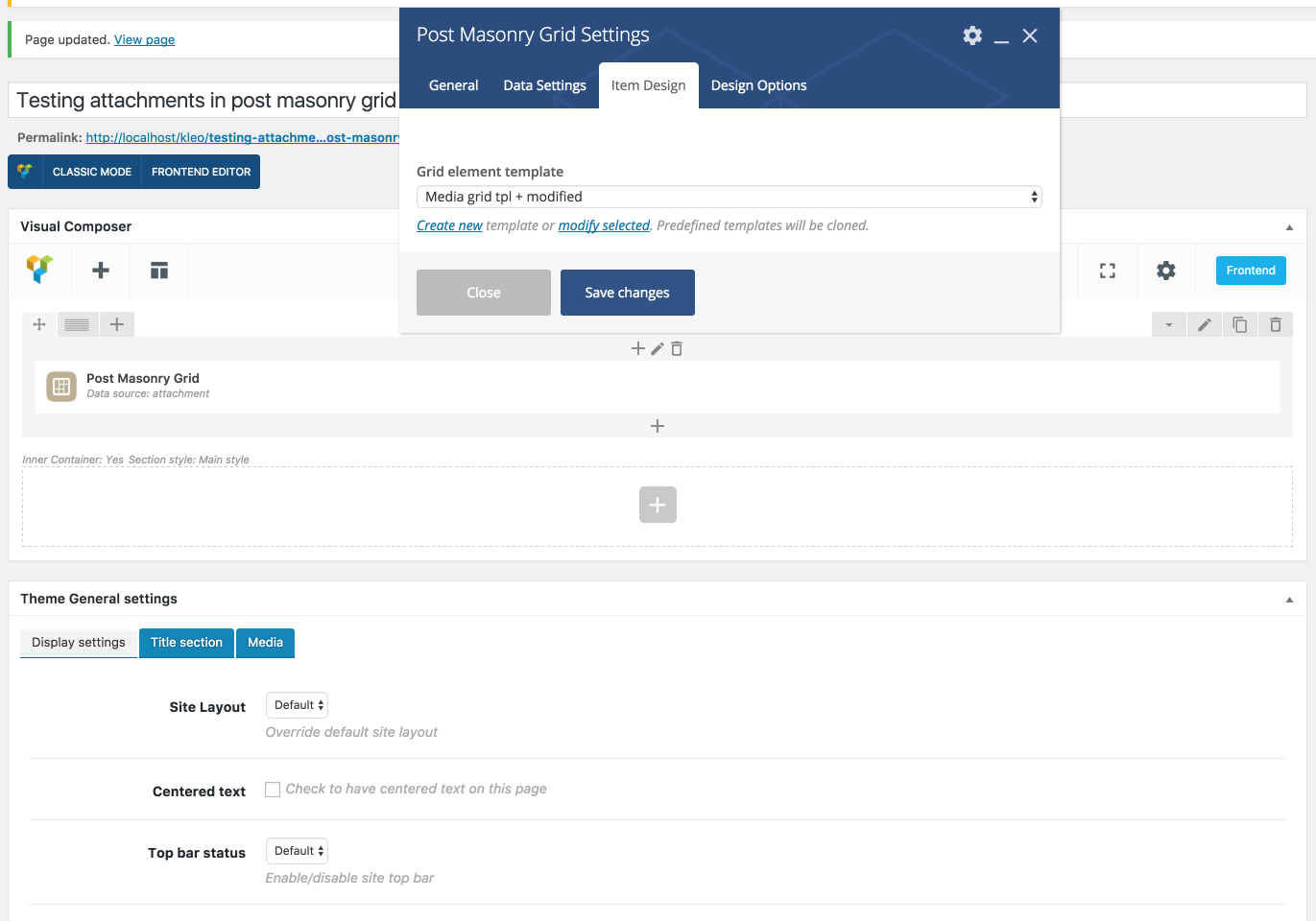
For the next question
“Also, I would like to make the colored panel of the grid transparent- does this need CSS? I can’t find anywhere in the grid settings to change transparency.”
Please provide to me a screenshot that points the thing that you want to have transparentCheers
R.Hi there!!! Help others from the community and mark any reply as solution if it solved your question. Mark as a solutionMarch 6, 2017 at 16:41 in reply to: PHP Warning: in_array() expects parameter 2 to be array, boolean given #154900ModeratorPlease provide FTP in a private reply.
Cheers
R.Hi there!!! Help others from the community and mark any reply as solution if it solved your question. Mark as a solutionModeratorHi,
You can change the frequency of ajax heartbeat using this plugin: https://ro.wordpress.org/plugins/heartbeat-control/ or you can de-activate it.
I cannot see the logo cuz your site it’s says 403 forbidden, I need to see your website first.
What login page? provide a screenshot please to can figure out.
Please install this plugin: https://ro.wordpress.org/plugins/p3-profiler/ and run it to can see what it’s the heavy process on your server that causes the high CPU usage
Cheers
R.Hi there!!! Help others from the community and mark any reply as solution if it solved your question. Mark as a solutionModeratorGreat
You’re welcome
Cheers
R.Hi there!!! Help others from the community and mark any reply as solution if it solved your question. Mark as a solutionModeratorA regular page yes but the register page it’s part of buddypress used for user registering and if you will restrict that a guest user cannot reach that page and it cannot create account.
And if the page it’s assigned as register page in buddypress settings, it’s possible to not works but for the rest of the pages yes.

Cheers
R.Hi there!!! Help others from the community and mark any reply as solution if it solved your question. Mark as a solutionModeratorYou’re welcome
Cheers
R.Hi there!!! Help others from the community and mark any reply as solution if it solved your question. Mark as a solutionModeratorAre you referring to that missing icons for unlogged ?
I don’t think that it’s a theme bug cuz on demo the icons are shown for guest users , if you de-activate the child theme those will be shown ?
Cheers
R.Hi there!!! Help others from the community and mark any reply as solution if it solved your question. Mark as a solutionMarch 6, 2017 at 16:09 in reply to: Error: woocommerce “please select some product options before adding this product to your cart” on mobile #154888ModeratorHi,
My recommendation’s to hide on mobile the buttons add to cart and quick view and users to click to desired product and to add it to cart from the product page
You can use this css to hide the buttons on mobile only
COPY CODE@media (max-width: 991px) { li.product figcaption .shop-actions { display:none; } }The CSS will be added to wp-admin -> theme options -> general settings -> quick CSS
Cheers
R.Hi there!!! Help others from the community and mark any reply as solution if it solved your question. Mark as a solutionModeratorHi,
Just add this code to wp-content/themes/kleo-child/functions.php
COPY CODEfunction my_cpt_sq_metabox_menu_options_post_layout($post_types) { $post_types[] = 'portfolio'; return $post_types; } add_filter('sq_metabox_page_menu', 'my_cpt_sq_metabox_menu_options_post_layout');That’s all
Cheers
R.Hi there!!! Help others from the community and mark any reply as solution if it solved your question. Mark as a solutionModeratorHi,
If you want to be redirected to register page when you click on signup you should copy this file : /wp-content/themes/sweetdate/header.php
to child theme in this path : /wp-content/themes/sweetdate-child/
Then in child theme follow the instructions form photo

Cheers
RHi there!!! Help others from the community and mark any reply as solution if it solved your question. Ticket solutionMarch 3, 2017 at 16:54 in reply to: PHP Warning: in_array() expects parameter 2 to be array, boolean given #154680ModeratorHi,
It does not seem to be a theme problem rather it’s a child theme issue, if you de-activate the child theme that will go right ?
WE cannot offer support for custom modificationsCheers
R.Hi there!!! Help others from the community and mark any reply as solution if it solved your question. Mark as a solutionModeratorHi again
I see it seems you need continue custom support and we cannot offer that… we can support oly theme problems and questions you have here custom development needs and i recommend you to hire a developer to implement and to adapt the restrictions as you need.
I’ve tried to provide you some functions to acheive that but it seems that not are sufficient.Have a nice week-end
https://wpgeodirectory.com/support/topic/add-listing-page-restriction/
https://wpgeodirectory.com/support/topic/paid-membership-pro-page-restriction/Cheers
R.Hi there!!! Help others from the community and mark any reply as solution if it solved your question. Mark as a solutionModeratorHi,
Those are not errors, those are some notices and you should disable wp debug if it’s activated from wp-config.php form root wp folder
https://codex.wordpress.org/WP_DEBUG
Cheers
R.Hi there!!! Help others from the community and mark any reply as solution if it solved your question. Mark as a solutionModeratorOk then
Cheers
R.Hi there!!! Help others from the community and mark any reply as solution if it solved your question. Mark as a solutionModeratorHi again,
That section with tabs it’s part of geodirectory and according to the geodirectory that tab can be removed using this setting
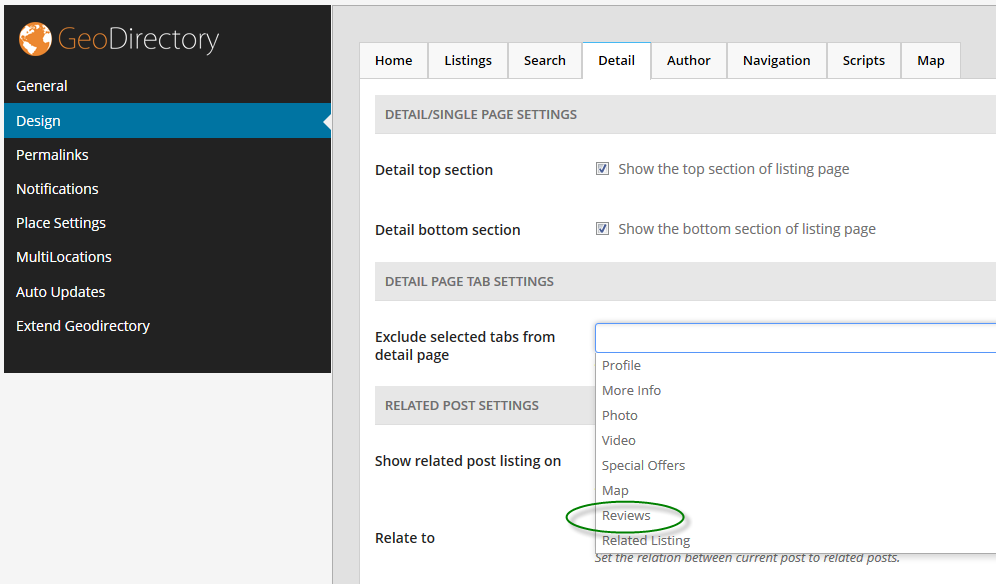
https://wpgeodirectory.com/support/topic/how-to-remove-the-reviews-tab/
Cheers
R.Hi there!!! Help others from the community and mark any reply as solution if it solved your question. Mark as a solutionModeratorHi,
IT’s not ok for you to use megamenu style for that? and then to re-arrange the items to divide them by 5-6 columns, the problem it’s you have to menu items as submenus and they don’t have enough space to view them in viewport you can try my suggestion.

Cheers
R.Hi there!!! Help others from the community and mark any reply as solution if it solved your question. Mark as a solutionModeratorHi,
After you copy file in child delete the green marked content
Cheers
RHi there!!! Help others from the community and mark any reply as solution if it solved your question. Mark as a solutionModeratorHi,
You should ask the hosting company to increase this value for you max_input_vars from 1000 to 2000.
I’ve tried to do that from php.ini / php.user.ini and htaccess and without success.
This will solve your problem, then you should re-assign the icon to the menu item
Cheers
R.Hi there!!! Help others from the community and mark any reply as solution if it solved your question. Mark as a solutionModeratorIf you will complete the form from homepage you will be redirected to the /register/ page to complete the rest of the details

That’s the way how it works
Cheers
R.Hi there!!! Help others from the community and mark any reply as solution if it solved your question. Mark as a solutionModeratorHi,
You will have to cpy comments.php file from wp-content/themes/kleo/comments.php to wp-content/themes/kleo-child/
then you should add the red marked code
 COPY CODE
<?php if (!is_singular( 'your_cpt' ) ) { ?> <?php } ?>Replace your_cpt with your cpt slug
Cheers
R.Hi there!!! Help others from the community and mark any reply as solution if it solved your question. Mark as a solutionModeratorHi
Wordpress allow by default only few elements like a b i if you need other elements to be allowed follow this link : http://wordpress.stackexchange.com/questions/17947/expanding-the-allowed-html-tags-in-comments
Cheers
RHi there!!! Help others from the community and mark any reply as solution if it solved your question. Mark as a solutionMarch 2, 2017 at 15:59 in reply to: PHP Warning: in_array() expects parameter 2 to be array, boolean given #154603ModeratorHi
The problem may be other
COPY CODE[28-Feb-2017 22:39:50 UTC] PHP Fatal error: Call to undefined function adrotate_group() in /mnt/stor14-wc1-dfw3/staging.ilovenz.me/web/content/wp-content/themes/kleo-child/single.php on line 65The adrotate_group() cannot be called maybe in beginning you have used ad rotate plugin and now it’s not activated or deleted
Check that
Cheers
R.Hi there!!! Help others from the community and mark any reply as solution if it solved your question. Mark as a solutionModeratorOk then
Have a nice day
Cheers
RHi there!!! Help others from the community and mark any reply as solution if it solved your question. Mark as a solutionModeratorOk now check the debug.log file located in wp-content/ directory
Cheers
RHi there!!! Help others from the community and mark any reply as solution if it solved your question. Mark as a solution -
AuthorPosts