

Forum Replies Created
-
Author
-
Radu
ModeratorI saw that, using kleo template the author link http://www.zinzino.rocks/editor/billyboy/ it’s not displayed the book, please leave there the FTP login credentials in a private reply to can take a closer look at that
Cheers
R.Hi there!!! Help others from the community and mark any reply as solution if it solved your question. Mark as a solutionModeratorYou should what plugin load that to the website, if you de-activate all plugins this will continue to load ? if not activate plugins back one by one and check to see what load that thru the website
Let me know
Hi there!!! Help others from the community and mark any reply as solution if it solved your question. Mark as a solutionModeratorHi,
Kleo doesn’t have this kind of functionality, personally i don’t know a solution for this, search of stackoverflow and google how to implement this.
Cheers
R.Hi there!!! Help others from the community and mark any reply as solution if it solved your question. Mark as a solutionModeratorHi,
You can use this CSS to hide the sidebar on mobile
COPY CODE@media (max-width:991px) { .sidebar {display:none;} }You can change the 991 px value with a lower one.
Cheers
R.Hi there!!! Help others from the community and mark any reply as solution if it solved your question. Mark as a solutionModeratorOk let me know
Hi there!!! Help others from the community and mark any reply as solution if it solved your question. Mark as a solutionModeratorOk activate back your plugins and test the behaviour, let me know
Cheers
R.Hi there!!! Help others from the community and mark any reply as solution if it solved your question. Mark as a solutionModeratorSure,
Marked as private.And how it works now ?
Let me know
Cheers
R.Hi there!!! Help others from the community and mark any reply as solution if it solved your question. Mark as a solutionModeratorHi @lordival
Please open a new ticket describing completely your problem including screenshots to understand correctly what’s your problem
Cheers
R.Hi there!!! Help others from the community and mark any reply as solution if it solved your question. Mark as a solutionModeratorI think it’s an old requirement
Just remove the code if without it works as it should
Cheers
R.Hi there!!! Help others from the community and mark any reply as solution if it solved your question. Mark as a solutionModeratoryes both
Let me know
Hi there!!! Help others from the community and mark any reply as solution if it solved your question. Mark as a solutionModeratorYou’re welcome
Cheers
R.Hi there!!! Help others from the community and mark any reply as solution if it solved your question. Mark as a solutionModeratorYou’re welcome
A specific security setting on the server, i don’t know exactly cuz investigating this taking to much time, but it works!
Cheers
R.Hi there!!! Help others from the community and mark any reply as solution if it solved your question. Mark as a solutionMarch 9, 2017 at 18:20 in reply to: Links from top of the menu and social menu not working in Chrome and Firefox #155226ModeratorHi,
This it’s not happening on theme demo, maybe you have customized the child theme with some custom styles, if you de-activate the child theme the links are clickable ?
Cheers
R.Hi there!!! Help others from the community and mark any reply as solution if it solved your question. Mark as a solutionMarch 9, 2017 at 18:02 in reply to: Add Media Description field to a grid template for use in Post Masonry Grid #155223ModeratorCan you please provide to me an account to can see live the library page to can test also the css selector for that bg ?
Cheers
R.Hi there!!! Help others from the community and mark any reply as solution if it solved your question. Mark as a solutionModeratorHi,
Please try this function
COPY CODEfunction remove_asd_font_awesome() { wp_dequeue_style('font-awesome'); } add_action('after_setup_theme', 'remove_asd_font_awesome');The function needs to be pasted in wp-content/themes/kleo-child/functions.php
Let me know
Cheers
RHi there!!! Help others from the community and mark any reply as solution if it solved your question. Mark as a solutionModeratorHi,
Please show me the wpengine specific code please ?
It should be like this
COPY CODEadd_action( 'wp_enqueue_scripts', 'load_buddypress_js' ); function load_buddypress_js () { if (bp_is_group() || is_page( 'activity' )) { wp_enqueue_script('buddypress_query',plugins_url() . '/buddypress/bp-core/js/jquery-query.min.js',array("jquery")); wp_enqueue_script('buddypress_members',plugins_url() . '/buddypress/bp-core/js/widget-members.min.js',array("jquery")); wp_enqueue_script('buddypress_cookie',plugins_url() . '/buddypress/bp-core/js/jquery-cookie.min.js',array("jquery")); wp_enqueue_script('buddypress_scroll', plugins_url() . '/buddypress/bp-core/js/jquery-scroll-to.min.js', array("jquery")); wp_enqueue_script('buddypress_js',get_template_directory_uri() . '/buddypress/js/buddypress.min.js',array("jquery")); } }But if you delete the code form functions you are able to post and comment to buddypress activity etc?
Anyway the compat code it’s between buddypress and wp engine not between kleo and wp engine you can ask the wpengine support about that
Let me know
Hi there!!! Help others from the community and mark any reply as solution if it solved your question. Mark as a solutionModeratorI see,
Please try to do the next (see screenshot)

The full path should be specified on the second field maybe this is the cause.
This it’s an isolated problem I cannot reproduce that in my local install so that I’ve told you different things to check
Let me know
Don’t forget to empty all caches, it’s preferred to de-activate caching plugin while testing
Cheers
R.Hi there!!! Help others from the community and mark any reply as solution if it solved your question. Mark as a solutionModeratorNo problem
Cheers
R.Hi there!!! Help others from the community and mark any reply as solution if it solved your question. Mark as a solutionModeratorHi
Thank, you I’ve de-activated the wordfence and I cannot see the 404 link of that resource and the CSS it’s always loaded ( I’ve tried 15 – 20 pages refresh and access again from new windows)
Let me know if you notice if this issue had dissapeared with wordfence plugin de-activated.
Let me now
Cheers
R.Hi there!!! Help others from the community and mark any reply as solution if it solved your question. Mark as a solutionMarch 8, 2017 at 18:38 in reply to: Links from top of the menu and social menu not working in Chrome and Firefox #155098ModeratorHi,
Your site doesn’t have a top bar so, I cannot identify the links from top bar can you please make a screenshot pointing that non-working links please ?
The main menu navigation works as it should and also the submenu items.
Cheers
R.Hi there!!! Help others from the community and mark any reply as solution if it solved your question. Mark as a solutionModeratorHi,
Sweet date uses standard of WordPress for database so if the WordPress it’s compatible also the SweetDate it’s compatible
https://wordpress.org/about/requirements/
Cheers
R.Hi there!!! Help others from the community and mark any reply as solution if it solved your question. Mark as a solutionModeratorHi,
Can you please provide the FTP and admin credentials to take a closer look please?
Cheers
R.Hi there!!! Help others from the community and mark any reply as solution if it solved your question. Mark as a solutionMarch 8, 2017 at 17:05 in reply to: PHP Warning: in_array() expects parameter 2 to be array, boolean given #155087ModeratorHi,
While debugging the issue with the ajax login,i’ve deleted the debug.log file to can see clean the new errors/notices and no kleo error or notice it’s displayed at the moment in debug.log file
Cheers
R.Hi there!!! Help others from the community and mark any reply as solution if it solved your question. Mark as a solutionModeratorHi,
Fixed please check,
I’ve added this function to your child theme to can make this work, please keep and use that function on that hosting environment, it haves some specific security settings.
If any other users encounter a similar issue with plugins disabled this function can help.
COPY CODEfunction ovewrite_kleo_ajax_login_method() { $obj_array['loginUrl'] = site_url(); return $obj_array; } add_filter('kleo_localize_app','ovewrite_kleo_ajax_login_method');The function needs to be pasted in wp-content/themes/kleo-child/functions.php
Cheers
R.Hi there!!! Help others from the community and mark any reply as solution if it solved your question. Mark as a solutionMarch 8, 2017 at 16:08 in reply to: Add Media Description field to a grid template for use in Post Masonry Grid #155066ModeratorCan I see your page? and a screenshot that points the element that you want to change the background?
So you have workaround the description for the attachments using a custom field plugin right? Meanwhile we will announce the VC team about that.
Cheers
R.Hi there!!! Help others from the community and mark any reply as solution if it solved your question. Mark as a solutionMarch 8, 2017 at 15:59 in reply to: [ Solved + Solution ] Excerpt lenght in WordPress blog page #155065ModeratorDo you have Kleo child theme installed and activated ? It’s required
Hi there!!! Help others from the community and mark any reply as solution if it solved your question. Mark as a solutionModeratorHi,
You can contact our development team at this address dev@seventhqueen.com
Have a nice day
Cheers
R.Hi there!!! Help others from the community and mark any reply as solution if it solved your question. Mark as a solutionModeratorHi,
You should give them access to can take a look
According to your initial message “But Mooberry is generating taxonomy based book grids for genre, tags, editors and more. And those are broken.”
How are they broken? What’s the difference between the plugin running thru kleo and running thru a default theme, I need to know more details more than “broken”, please describe in details what it’s happens
I recommend you to put the install somewhere online, maybe it will be needed to take a closer look at that.Cheers
R.Hi there!!! Help others from the community and mark any reply as solution if it solved your question. Mark as a solutionModeratorHi,
You’re welcome
See the next image Hi there!!! Help others from the community and mark any reply as solution if it solved your question. Mark as a solutionModerator
Hi,
I saw that, you are hosted somehow at the wp-engine ?
In general this kind of errors can be caused by some specific security setting on the hosting provider.
But you can leave there the FTP login in a private reply to can take a closer look at that.
Cheers
R.Hi there!!! Help others from the community and mark any reply as solution if it solved your question. Mark as a solutionMarch 7, 2017 at 16:06 in reply to: Mobile theme parsing too slow. Showing white screen when scrolling down fast. #154983ModeratorOk then
You’re welcome
Cheers
R.Hi there!!! Help others from the community and mark any reply as solution if it solved your question. Mark as a solutionMarch 7, 2017 at 16:05 in reply to: Add Media Description field to a grid template for use in Post Masonry Grid #154982ModeratorHi,
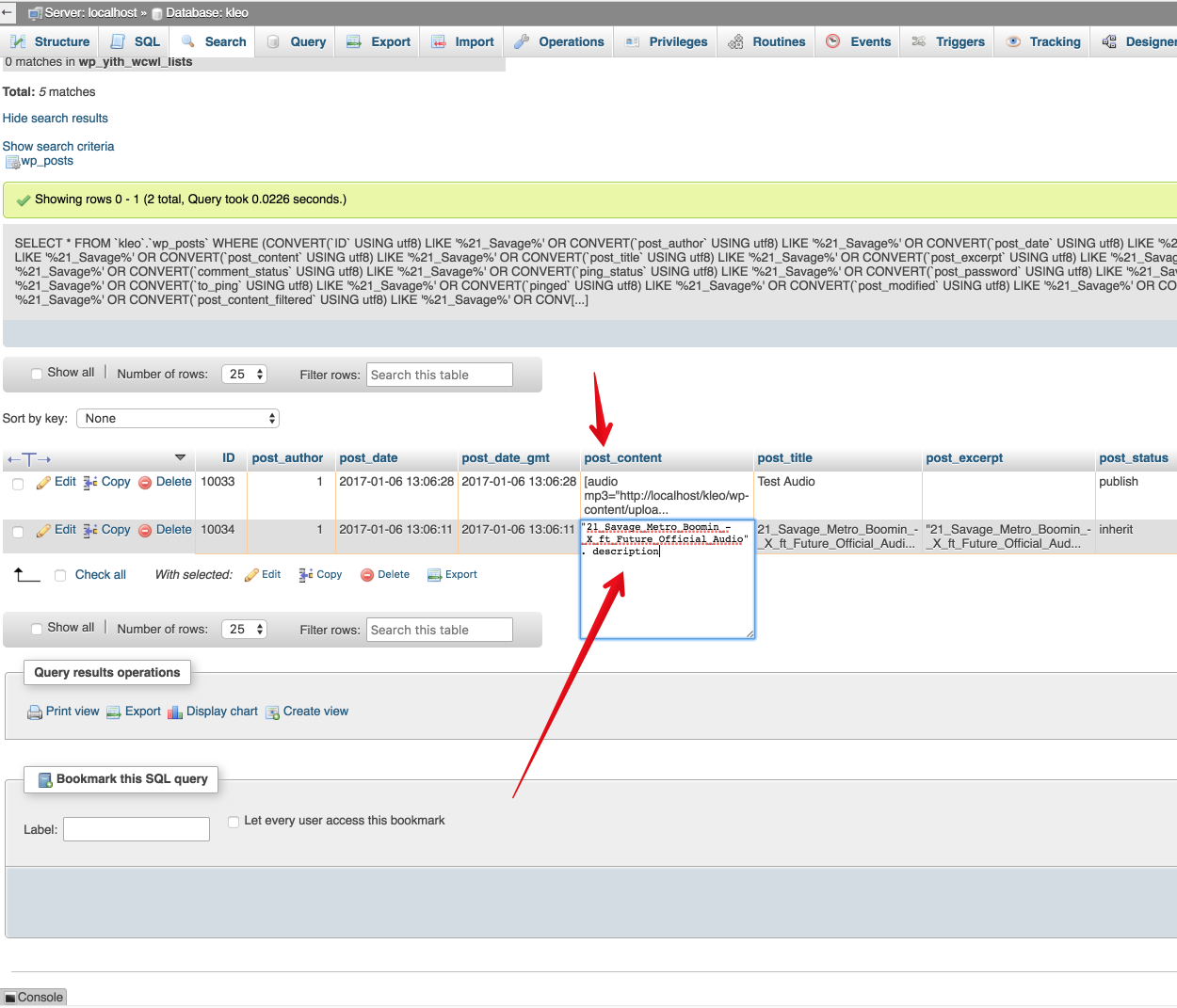
I’ve tried to get that to work but it seems that VC doesn’t allows you to pull the post content but only post excerpt and the attachments added in wp_post table and the description field are actually the post_content so currently the post_content cannot be pulled.
Also you cannot pull the post_content using custom fields cuz the description field it’s post_content not a post meta.
Hope it makes sense
We will notice VC about this but until then if you want this functionality i recommend you to hire a developer to achieve that.
Cheers
R.Hi there!!! Help others from the community and mark any reply as solution if it solved your question. Mark as a solution -
AuthorPosts