

Forum Replies Created
-
Author
-
Radu
ModeratorI see, can you please provide admin credentials in a private reply to take a look ?
Hi there!!! Help others from the community and mark any reply as solution if it solved your question. Mark as a solutionModeratorHi,
You can try to change the email address from here :

You can try to forward from you email address emails that have certain subject to your partner mail
Cheers
RHi there!!! Help others from the community and mark any reply as solution if it solved your question. Mark as a solutionModeratorHi,
No problem
Cheers
R.Hi there!!! Help others from the community and mark any reply as solution if it solved your question. Mark as a solutionDecember 13, 2016 at 18:58 in reply to: To Dos not working in header – Links for todos in menu #146933ModeratorHi,
The tasks plugin that we use in demo it’s a tasklist plugin not a task plugin, if you want to use more complex plugin with more features simply you can use this plugin : https://wordpress.org/plugins/task-manager/ or any other task plugin that fits your needs and place the task plugin shortcode.
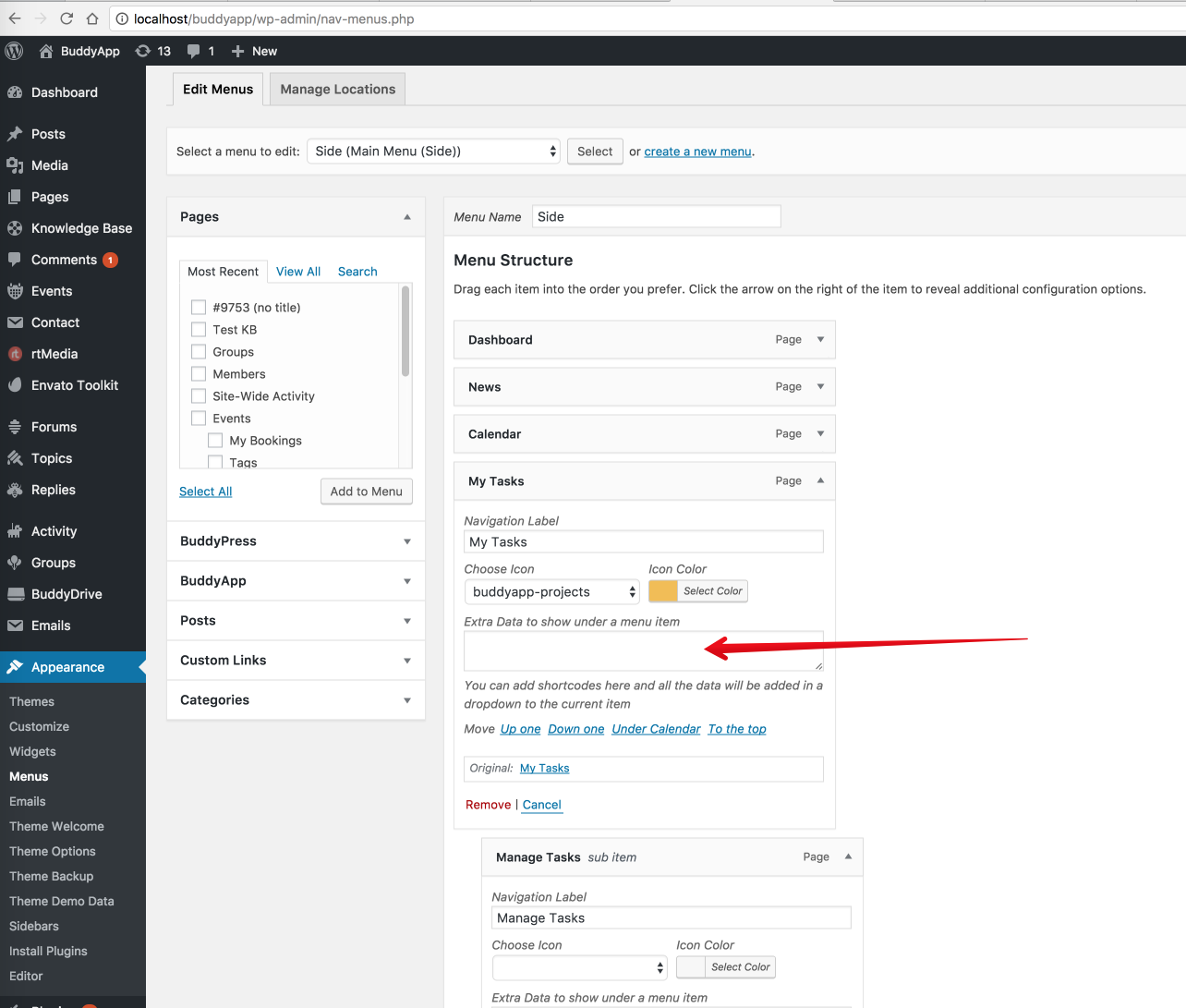
Here it;s documentation for the current to do list plugin with all supported parameters to the shortcodes : https://wordpress.org/plugins/cleverness-to-do-list/faq/
Cheers
RHi there!!! Help others from the community and mark any reply as solution if it solved your question. Mark as a solutionModeratorIF the notifications it’s send to the main email from wordpress ofc the email can be changed from there, I was referring that it’s no way to change destination address from the plugin
Cheers
R.Hi there!!! Help others from the community and mark any reply as solution if it solved your question. Mark as a solutionModeratorPersonally i don’t know that kind of plugin to recommend , but my advice with row divided by 4 at the end of the pages should be reliable.
Cheers
R.Hi there!!! Help others from the community and mark any reply as solution if it solved your question. Mark as a solutionModeratorI was referring to the functions.php file from the child
You will have to comment that add_action and add_filter if this exists, in this way those will not run and will not trigger the functions attached to those, in this way you will identify what code causes the comment that disappears after refresh.

Cheers
R.Hi there!!! Help others from the community and mark any reply as solution if it solved your question. Mark as a solutionModeratorHi,
I’ve thought that you want to have cart like that, there is no ready solution to can keep the cart icon in topmenu on mobile, anyway the cart will be to small to can be tapped on mobile that’s why it’s placed directly there,to can be tapped on mobile.
Cheers
R.Hi there!!! Help others from the community and mark any reply as solution if it solved your question. Mark as a solutionModeratorHi,
If you switch the theme with the default one you see both meta description ? If yes it means that has nothing to do with KLEO and it’s problem between plugin that you had mention.
Let me know
Cheers
R.Hi there!!! Help others from the community and mark any reply as solution if it solved your question. Mark as a solutionDecember 13, 2016 at 17:59 in reply to: Need an answer. 3 times asking for support and didn’t get it #146917ModeratorNot marked as solutionModeratorHi,
Those errors won’t cause any problems for using , they are referring to the WordPress theme directory.
The theme it’s already checked with theme check to can be published on theme forest.
So you can ignore that
Cheers
Hi there!!! Help others from the community and mark any reply as solution if it solved your question. Mark as a solutionModeratorHi,
On mine this is how it looks on safari :

And this is how it looks on chrome

It looks the same if you see in one of the browsers gray menu bg empty browser caches.
To haveing purple color on hover use this CSS
COPY CODE.primary-menu ul li a:hover { color: purple; }The Css will be added to wp-admin -> theme options -> general settings -> quick css
As you can see in the screenshots the BuddyPress navigation haves black font,let me know if you want to change something from bp navigation
Cheers
R.Hi there!!! Help others from the community and mark any reply as solution if it solved your question. Mark as a solutionDecember 13, 2016 at 17:13 in reply to: Need an answer. 3 times asking for support and didn’t get it #146908ModeratorNot marked as solutionModeratorNo problem
R.Hi there!!! Help others from the community and mark any reply as solution if it solved your question. Mark as a solutionModeratorThere is no PHP code to provide for that.
Strings like those : Marital Status, City, Relationship can be added/edited from wp-admin -> users -> profile fields.
For translation strings, most probably there are some encoded character, correct it on your language if it’s not rendered correctly
R.
Hi there!!! Help others from the community and mark any reply as solution if it solved your question. Mark as a solutionModeratorIn what plugin you have translated those strings ?
Try to translate post an update in kleo and also in BuddyPress plugin from loco, I will paste the translation procedure with loco, make sure to have language files on global directory because on theme update the files from wp-content/themes/kleo/ folder will be overwritten.
Theme strings and plugins strings can easily be changed by using Loco Translate plugin https://wordpress.org/plugins/loco-translate/
A small introduction on how translations work
Translatable strings can come from the theme or from the installed plugins. You need to translate the theme or the plugin depending on what section of the site your string is found.
For example if your string is on your BuddyPress profile then most probably you will need to translate BuddyPress plugin. If you are on the Forums section of your site then bbPress plugin should be the one that needs to be translated. Another example is the rtMedia plugin that adds the Media links to BuddyPress and if you want to translate it then this plugin will contain the string.
Follow these steps to get you started:
- Install Loco Translate plugin
- Go to the plugin dashboard: WP Admin – Tools – Manage translations
- Find the theme or plugin in the list.
- If the language isn’t already in the list then click Add new language, choose your language and if you are asked where you want to save the language files choose global language directory ( wp-content/languages/ ).
- Press SYNC button to synchronise your translation with the provided .pot file
- Search for the string you want to translate and add your translated string.
- Press Save when you finished your translation.
Note: You will have to set the language for your blog from WP-admin – Settings – General – Site Language – Choose your language
Let me know
Cheers
Hi there!!! Help others from the community and mark any reply as solution if it solved your question. Mark as a solutionModeratorHi,
I cannot reproduce the issue that you encounter on my local install
I’ve updated a post and I was abe to update it without receiving any error : https://drive.google.com/file/d/0Bxo5b6iHWRMweG1yQUJzSGxJeVU/view
Do you know exactly the steps to can reproduce that ?
Install and activate this plugin : https://wordpress.org/plugins/p3-profiler/screenshots/ and when you see that kind of error run the plugin to see if any plugin consumes the majority of resources.
If you are on a shared hosting, check and make sure if the available memory for your package it’s lower than your wp install uses, check with this plugin memory consumption : https://wordpress.org/plugins/query-monitor/
Cheers
R.Hi there!!! Help others from the community and mark any reply as solution if it solved your question. Mark as a solutionDecember 13, 2016 at 16:14 in reply to: Need an answer. 3 times asking for support and didn’t get it #146901ModeratorNot marked as solutionModeratorHi,
The installation service contains theme installation + demo content import, no premium support or other things.
If you want a quote from us for speed optimization send us an email at dev@seventhqueen.com
Cheers
R.Hi there!!! Help others from the community and mark any reply as solution if it solved your question. Mark as a solutionModeratorHi,
Desktop screen here :

Mobile, below, as attachment.
Cheers
R.Hi there!!! Help others from the community and mark any reply as solution if it solved your question. Mark as a solutionModeratorHi,
Desktop screen here :
Mobile, below, as attachment.
Cheers
R.Hi there!!! Help others from the community and mark any reply as solution if it solved your question. Mark as a solutionDecember 12, 2016 at 20:14 in reply to: Need an answer. 3 times asking for support and didn’t get it #146803ModeratorNot marked as solutionDecember 12, 2016 at 20:12 in reply to: Need an answer. 3 times asking for support and didn’t get it #146799ModeratorNot marked as solutionModeratorHi,
According to the plugin author this, it seems to not be possible to send notifications to another mail : https://wordpress.org/support/topic/review-notifications-sent-to-different-email/
Cheers
R.Hi there!!! Help others from the community and mark any reply as solution if it solved your question. Mark as a solutionModeratorHi,
The Kleo language files are located here :
/wp-content/themes/kleo/languages/en_US.po
/wp-content/themes/kleo/languages/en_US.mo
/wp-content/themes/kleo/languages/kleo_framework.potCheers
RHi there!!! Help others from the community and mark any reply as solution if it solved your question. Mark as a solutionModeratorHi,
Kleo doesn’t have any method to achieve that, this can be done with custom development.
You can use for pages a row placed ad the end of your content divided by 4 , and you will have 4 columns in that you can put anything you want
Cheers
R.Hi there!!! Help others from the community and mark any reply as solution if it solved your question. Mark as a solutionModeratorHi,
Regarding to this
No CSS load, since my wordpres update
Try to re-save theme options, it will re-generate the CSS.
For the rest I cannot identify what are the questions and how I can help you
Cheers
R.Hi there!!! Help others from the community and mark any reply as solution if it solved your question. Mark as a solutionModeratorHi,
My previous answer was referring to this
However, activating KLEO Parent theme did solve the issue. So the problem is specific to the Child Theme, which makes me think it some coding that we changed in the PHP or CSS files.
And my advice was to comment every add_action and add_filter from the function file from child to identify if one of the functions causes that.
No code to add, just to comment add_action,add_filters, those will trigger the function to loaded thru wp core.
Cheers
RHi there!!! Help others from the community and mark any reply as solution if it solved your question. Mark as a solutionDecember 12, 2016 at 19:33 in reply to: Problem with position of Title when using transparent centered Menu #146790ModeratorHi,
Those options : Fixed menu + transparent menu cannot work at once only in same cases, like your homepage where the title missing.
Those features should be not used sitewide, and you can have both things only on certain pages only using the panel under each page backend

So my advice it’s both features only in pages that the title it’s not there.
Cheers
RHi there!!! Help others from the community and mark any reply as solution if it solved your question. Mark as a solutionModeratorHi,
Use this snippet instead, it should work just i’ve tested
COPY CODEfunction sq7_altering_ajax_search($defaults){ $defaults['cat'] = '-20'; return $defaults; } add_filter( 'kleo_ajax_query_args', 'sq7_altering_ajax_search');Cheers
RHi there!!! Help others from the community and mark any reply as solution if it solved your question. Mark as a solutionModeratorHi,
I’ve reproduced that bug on my local install and this it seems that comes from Visual Composer, we will write to the Visual Composer team about this issue and we will let you know the status of this issue.
Using a video as background haves sound off by default and there is no option to enable it.
Cheers
R.Hi there!!! Help others from the community and mark any reply as solution if it solved your question. Mark as a solutionModeratorHmm,Make sure to have latest Kleo version and latest plugins updates,check for plugin updates after theme update in wp-admin -> appearance -> install plugins
The option should be there
Cheers
R.Hi there!!! Help others from the community and mark any reply as solution if it solved your question. Mark as a solutionModeratorOk then
Cheers
RHi there!!! Help others from the community and mark any reply as solution if it solved your question. Mark as a solutionModeratorHi,
Those notices comes from the pmpro plugin and has nothing to do with your problem, the menu problem it’s caused by having two bootstrap scripts loaded into site, so one of you plugins loads bootstrap framework, please deactivate plugins one by one to identify the plugin, after you will find it look in the plugin options panel if haves some options to set off loading bootstrap.
Cheers
R.Hi there!!! Help others from the community and mark any reply as solution if it solved your question. Mark as a solution -
AuthorPosts