

Forum Replies Created
-
Author
-
Radu
ModeratorNo problem
Cheers
R.Hi there!!! Help others from the community and mark any reply as solution if it solved your question. Mark as a solutionModeratorNo problem
Cheers
R.Hi there!!! Help others from the community and mark any reply as solution if it solved your question. Mark as a solutionModeratorHi again…
From what i figure it seems that the error that wise chat shows it’s related to a type of file that it’s not allowed to be uploaded, the plugin author says that it’s not a plugin problem ?
Do you have mentioned that you are trying to upload a gif or png file ? if you upload a jpg file it should work… see the next screenshot with the default allowed extensions for the files, if you are trying to upload other file extensions add them there.

About what register button are you talking about ? screenshot pleasem when i visit your website it shows 404 page in home.. screenshot please
Cheers
R.Hi there!!! Help others from the community and mark any reply as solution if it solved your question. Mark as a solutionModeratorHi,
I don’t understand french enough to understand your entire message, please post your questions in english please.
Cheers
R.Hi there!!! Help others from the community and mark any reply as solution if it solved your question. Mark as a solutionSeptember 6, 2016 at 16:05 in reply to: Pop up images in portfolio always start at first image no matter which I click on #135105ModeratorOk,
We will let you know when it’s fixed
Cheers
R.Hi there!!! Help others from the community and mark any reply as solution if it solved your question. Mark as a solutionSeptember 6, 2016 at 16:02 in reply to: Reset password link from wp-login to 404 (possibly linked with 4.1.3) #135104ModeratorIf you will use /lost-password/ page and not the default wp lost password page yes you should have WooCommerce activated, or you can search for a plugin for reset password in wp repository
R.
Hi there!!! Help others from the community and mark any reply as solution if it solved your question. Mark as a solutionSeptember 6, 2016 at 15:49 in reply to: High volume of fake account creation with Facebook registration #135103ModeratorHi,
You understand what you want, in wp repository, the plugin that I have suggested for you is not only one spam prevention tool, I,ve suggested to you to try another similar plugin but you don’t you want!
PS : We cannot offer support and implementations for your custom project and for the functionalities that you want to achieve and are not related to the theme.
We will take into consideration that issue that you have reported, but this will not be solved now… as you want and need for your project and will be added to end of the improovment list and when it goes the task turn we will investigate and fix, I cannot you give you an ETA.
I hope you understand
R.
Hi there!!! Help others from the community and mark any reply as solution if it solved your question. Mark as a solutionModeratorI saw a js error in console in group page, please update the theme to latest version and check again and let me know
Cheers
R.Hi there!!! Help others from the community and mark any reply as solution if it solved your question. Mark as a solutionModeratorI saw a js error in console in group page, please update the theme to latest version and check again and let me know
Cheers
R.Hi there!!! Help others from the community and mark any reply as solution if it solved your question. Mark as a solutionModeratorYou can have the counter values by copying the entire shortcode for each counter There is no way to get values dynamically and to show them in another page you should copy same shortcodes and paste to portfolio that you need.
Cheers
R.
Moderator
There is no way to get values dynamically and to show them in another page you should copy same shortcodes and paste to portfolio that you need.
Cheers
R.
ModeratorHi,
The translations files are ok but i think another it’s the problem, i think the language file path it’s the cause : where are the placed the buddypress mo and po files that you have provided to me ?
That this should be correct path : /wp-content/languages/plugins if the files are in other path move the files here and check again, if this not makes any difference provide FTP + wp admin credentials to investigate
Cheers
R.Hi there!!! Help others from the community and mark any reply as solution if it solved your question. Mark as a solutionModeratorUse this css
COPY CODE.bp-login-widget-user-avatar { border-radius: 0; border: 0; } #item-header > #item-header-avatar { border: 0; }The second rule will remove the border for the user profile pic
Cheers
R.Hi there!!! Help others from the community and mark any reply as solution if it solved your question. Mark as a solutionSeptember 6, 2016 at 13:23 in reply to: Problem With buddypress member search (Multi Select Box) #135089ModeratorHi,
YEs, there was a CSS problem, add this css to quick css area
COPY CODEul.multiselect-container.dropdown-menu { overflow-y: scroll; max-height: 250px; }CSs will be added to wp-admin -> theme options -> general settings -> quick css
Cheers
R.Hi there!!! Help others from the community and mark any reply as solution if it solved your question. Ticket solutionSeptember 6, 2016 at 13:23 in reply to: Problem With buddypress member search (Multi Select Box) #135088ModeratorHi,
YEs, there was a CSS problem, add this css to quick css area
COPY CODEul.multiselect-container.dropdown-menu { overflow-y: scroll; max-height: 250px; }CSs will be added to wp-admin -> theme options -> general settings -> quick css
Cheers
R.Hi there!!! Help others from the community and mark any reply as solution if it solved your question. Mark as a solutionModeratorHi,
We don’t have this kind of materials to provide but we have an how to guide, take a look here : https://archived.seventhqueen.com/documentation/kleo#installing-the-theme
VIDEO TUTORIAL : https://archived.seventhqueen.com/video-tutorials/kleo-quick-install-and-setup.html
FTP METHOD : https://www.youtube.com/watch?v=aK05TLbQ6oA
Cheers
R.Hi there!!! Help others from the community and mark any reply as solution if it solved your question. Mark as a solutionModeratorHi,
If the images are small like those in the sidebar i recommend you around 100x100px,
You can remove the “circle overlay” with this css
COPY CODE.sidebar .news-thumb img { border-radius: 0 !important; }that should be added to wp-admin -> theme options ->general settings -> quick css
Cheers
R.Hi there!!! Help others from the community and mark any reply as solution if it solved your question. Mark as a solutionSeptember 5, 2016 at 20:17 in reply to: Reset password link from wp-login to 404 (possibly linked with 4.1.3) #135032ModeratorTry to re-save permalinks from wp-admin -> settings -> permalinks -> save changes, do you have somehow de-activated woocommerce ?
R.
Hi there!!! Help others from the community and mark any reply as solution if it solved your question. Mark as a solutionModeratorHi,
Please use the FTP method : https://archived.seventhqueen.com/documentation/kleo#installing-the-theme
You can take a look at this video tutorial for FTP method : https://www.youtube.com/watch?v=aK05TLbQ6oA
Cheers
R.Hi there!!! Help others from the community and mark any reply as solution if it solved your question. Mark as a solutionModeratorHi,
You can modify the html structure of the header by copying this file : /wp-content/themes/kleo/page-parts/general-header-section.php to wp-content/themes/kleo-child/page-parts/general-header-section.php then you can paste the slider shortcode at this line :
 COPY CODE
<?php echo do_shortcode('[SLIDERSHORTCODE]'); ?>Cheers
R.Hi there!!! Help others from the community and mark any reply as solution if it solved your question. Mark as a solutionModeratorHi,
Please with this plugin to achieve what you need : https://wordpress.org/plugins/buddypress-shortcodes/ and let me know
Cheers
R.Hi there!!! Help others from the community and mark any reply as solution if it solved your question. Mark as a solutionModeratorHi,
It’s possible but that it’s not a quick solution… leave ftp and admin credentials and these days i will do that for you
Cheers
R.Hi there!!! Help others from the community and mark any reply as solution if it solved your question. Mark as a solutionModeratorHi,
Your map error it’s shown because you haven’t added an api key for the google maps in the plugin settings, if you have moved to another server you should generate a new key that allows to run on that new domain.
Wp-admin -> geodirectory -> design -> map -> Google Maps API KEY -> there you will find a link from where you can create a new key
Cheers
R.Hi there!!! Help others from the community and mark any reply as solution if it solved your question. Mark as a solutionModeratorHi,
Provide url and admin credentials to take a look
cheers
R.Hi there!!! Help others from the community and mark any reply as solution if it solved your question. Mark as a solutionModeratorHi guys,
Playing with those options it’s not enough ?

If not you can use an advanced logic for this with the Peters Redirect plugin : https://wordpress.org/plugins/peters-login-redirect/
Cheers
R.Hi there!!! Help others from the community and mark any reply as solution if it solved your question. Mark as a solutionSeptember 5, 2016 at 18:43 in reply to: High volume of fake account creation with Facebook registration #135003ModeratorHi,
I haven’t used the ban hammer, you can ask about this situation the plugin author or you can search and test for another plugins
Cheers
r.Hi there!!! Help others from the community and mark any reply as solution if it solved your question. Mark as a solutionModeratorHi,
This can be caused by various things like : you try to upload a photo larger than upload limit, you don’t have permission to write files on the uploads directory
Take a look here : https://buddypress.org/support/topic/members-cant-upload-avatars/
and here : https://buddypress.org/support/topic/wrong-avatar-folder/#post-174661
I don’t think it’s a theme problem… you can try to use a default wp theme to see if this problem it’s happened also with the wp default theme
Cheers
R.
Hi there!!! Help others from the community and mark any reply as solution if it solved your question. Ticket solutionModeratorHi,
I think it’s related to that JS error from console :
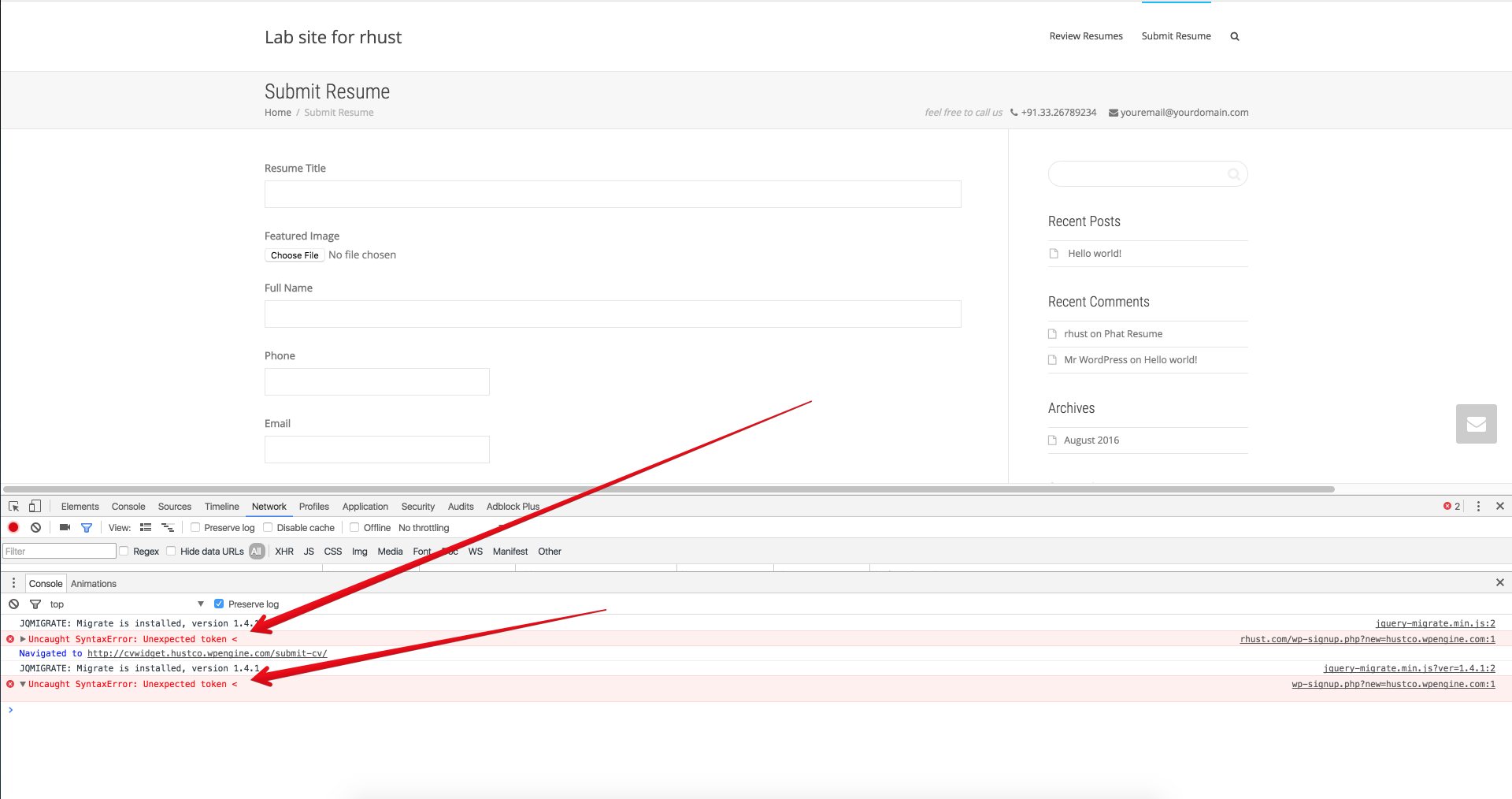
So, try to de-activate plugins one by one to identify which causes that, you can start with the third party plugins not with the plugins recommended by kleo
You can try to de-activate child theme if the de-activating plugins ddoesn’thave effect
Let me know
Cheers
R.Hi there!!! Help others from the community and mark any reply as solution if it solved your question. Ticket solutionSeptember 5, 2016 at 18:33 in reply to: CPT using standard single.php doesn’t have access to post layout [more] #135000ModeratorHi,
Check this : https://archived.seventhqueen.com/forums/topic/cpt#post-133400
You should use that functions to register the post layout and theme options for the new CPTS
Cheers
R.Hi there!!! Help others from the community and mark any reply as solution if it solved your question. Ticket solutionModeratorGreat
Have a nice week
Cheers
R.Hi there!!! Help others from the community and mark any reply as solution if it solved your question. Mark as a solutionModeratorHi, Thanks you for these information, we will investigate and we will let you know and most probably we will implement this too Cheers R.September 5, 2016 at 18:20 in reply to: Keep being redirected to wrong URL on login + notifications issues #134996ModeratorNot marked as solutionModeratorHi,
Unzip and upload the comments.php file to wp-content/theme/kleo-child/
Note : Child theme needs to be installed and activated
Cheers
R.Hi there!!! Help others from the community and mark any reply as solution if it solved your question. Mark as a solutionSeptember 5, 2016 at 18:12 in reply to: Pop up images in portfolio always start at first image no matter which I click on #134991ModeratorHi,
Please do not change the password to can be able to view this behavior, I will add this to the bug list and in future this will be fixed, also when we fix this we will provide to you the fix until the theme update
Cheers
R.Hi there!!! Help others from the community and mark any reply as solution if it solved your question. Mark as a solution -
AuthorPosts