

Forum Replies Created
-
Author
-
Radu
ModeratorYes,
Cheers
Have a nice week
R.
Hi there!!! Help others from the community and mark any reply as solution if it solved your question. Mark as a solutionModeratorHi,
1. We have not remove nothing, just re-upload the image, it takes 2 seconds
2. The image it applies as row bg before to press update ? do you have any cache plugin ? if you have some cache plugin empty/purge the cache.
If you haven’t solve this provide admin credentials to take a look
Cheers
R.Hi there!!! Help others from the community and mark any reply as solution if it solved your question. Mark as a solutionJuly 11, 2016 at 16:24 in reply to: I just found a bug on your demo site as well as my site.. #128773ModeratorHi,
I see, yes there is a bug, i will add this on the bug list and will be fixed in future, i’ve tried to fix this but it require dedicated time.
We will reply you to this ticket
Cheers
R.Hi there!!! Help others from the community and mark any reply as solution if it solved your question. Mark as a solutionModeratorYou’re welcome
I’ve highlighted the KLEO Child in the article to be sure the users will see that.
Let me know if i can close this ticket
Cheers
R.Hi there!!! Help others from the community and mark any reply as solution if it solved your question. Mark as a solutionModeratorHi,
Ddd also this css
COPY CODE.header-color .top-menu li > a:hover, .header-color #top-social li a:hover { color:red; }Replace red with your desired color
Cheers
R.Hi there!!! Help others from the community and mark any reply as solution if it solved your question. Mark as a solutionModeratorHi,
Please use those css
COPY CODE.header-color.social-header { background-color: yellow; } .header-color .top-menu li > a, .header-color #top-social li a { font-family: monospace; color: red; }The css will be added to wp-admin -> theme options -> general settings -> quick css
Cheers
R.Hi there!!! Help others from the community and mark any reply as solution if it solved your question. Mark as a solutionModeratorSo,
Everything it’s ok ? Can i mark the topic as resolved?
Cheers
R.Hi there!!! Help others from the community and mark any reply as solution if it solved your question. Mark as a solutionModeratorHi,
In the sidebar i see that you are using an widget that paginate the activity, do you have solved ?
Where i can see a long list… to can take a look at it to make it scrollable ?
Cheers
R.Hi there!!! Help others from the community and mark any reply as solution if it solved your question. Mark as a solutionJuly 8, 2016 at 17:48 in reply to: Show link to post forum or Post to Contributor after login #128532ModeratorCan you please provide admin credentials and subscriber account to test please ?
Cheers
R.Hi there!!! Help others from the community and mark any reply as solution if it solved your question. Mark as a solutionModeratorHi,
Please add resources to the exception list until the site it will works, you know the cause now please add the following resources to the exception list and then add the rest of them if it’s not sufficient, and after any change to the w3 total cache settings is mandatory to purge all caches!!
Cheers
R.Hi there!!! Help others from the community and mark any reply as solution if it solved your question. Mark as a solutionModeratorHi,
Done please check,
I’ve made a KB article about these with exact steps to follow to get this work
https://archived.seventhqueen.com/kleo/article/use-custom-fontello-icons-kleo-theme
Cheers
R.Hi there!!! Help others from the community and mark any reply as solution if it solved your question. Ticket solutionModeratorNow the footer it looks ok, see the screenshot

No other plugin loads bootstrap framework, so the problems are caused by the minifying of JS in this case please add the exception list
http://yourdomain.com/wp-content/themes/kleo/assets/js/app.js
http://yourdomain.com/wp-content/themes/kleo/assets/js/app.min.jsThe area where you should add these it looks like that :
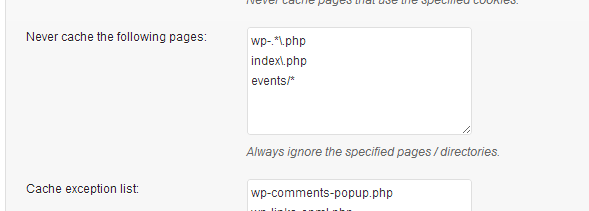
You can add only file names app.js and app.min.js
I think your footer problem was caused by cache that remains in CDN
Cheers
R.Hi there!!! Help others from the community and mark any reply as solution if it solved your question. Mark as a solutionModeratorThere can be 2 causes for these,
1. You should purge all caches inclusive from the CDN servers
2. One of you used plugins can load bootstrap library over the existing one, so please purcge empty all caches, de-activate the w3 total cache and let me know when i can view your website without cache plugin, also i’ve noticed a problem on your website that can be caused by this, you mobile menu it’s not expanding.
Another cause for those problems can be minifying the resources that are already minified, so look in the w3 total cache settings for excluding resources and add the app.js and app.min.js files
http://yourdomain.com/wp-content/themes/kleo/assets/js/app.js
http://yourdomain.com/wp-content/themes/kleo/assets/js/app.min.jsCheers
R.Hi there!!! Help others from the community and mark any reply as solution if it solved your question. Mark as a solutionModeratorYou’re very welcome
I’m glad if you have solved your task !
If you are satisfied by our client support service please leave a positive review about this on the themeforest.net KLEO page : https://themeforest.net/item/kleo-next-level-wordpress-theme/reviews/6776630
Thank you in advance.
Have a nice week
Cheers
R.Hi there!!! Help others from the community and mark any reply as solution if it solved your question. Mark as a solutionModeratorHi,
Maybe you have figure out/fixed the problem with the footer now the footer it’s displayed ok, by default footer is like in demo, don’t need any specific settings only to have widgets added to the footer sidebars

If you are satisfied by the client support service please leave a review about this on the themeforest kleo page : https://themeforest.net/item/kleo-next-level-wordpress-theme/reviews/6776630
Cheers
R.Hi there!!! Help others from the community and mark any reply as solution if it solved your question. Mark as a solutionModeratorHi again,
1. Sincerely i don’t understand, i’ve looked at your footer and i everything it’s fitting ok.

2. Follow this KB link please : https://archived.seventhqueen.com/kleo/article/limit-excerpt
3. You can change the Read More text by copying this file : /kleo/wp-content/themes/kleo/page-parts/post-content-masonry.php to /wp-content/themes/kleo-child/page-parts/ then edit the file that you have copied to child theme, open the file and around line 202 you will see the read more string, see the attached screenshot for additional hints.

Have a nice week
Cheers
R.Hi there!!! Help others from the community and mark any reply as solution if it solved your question. Mark as a solutionModeratorHi,
Thank you for the suggestion, in future we will create a showcase with known compatible plugins with KLEO
If you have tested any other plugins with Kleo you can share the plugin names here.
Thank you
Cheers
R.Hi there!!! Help others from the community and mark any reply as solution if it solved your question. Mark as a solutionModeratorHi,
From what i know links with parameters in URL like this : style.css?v=4.08 cannot be cached by default and it treated as dynamic resource anyway, you can open style.css file from child and change theme version from there.
The styles can be loaded also in wp-admin -> theme options -> general settings -> quick css
Cheers
R.Hi there!!! Help others from the community and mark any reply as solution if it solved your question. Mark as a solutionModeratorPlease don’t forget to rate us 5 stars at themeforest if you have time and also will be useful for us and for rest of the users if you will leave a short review about the customer support service.
Hi there!!! Help others from the community and mark any reply as solution if it solved your question. Mark as a solutionModeratorYou’re welcome
Have a nice week end
Cheers
R.Hi there!!! Help others from the community and mark any reply as solution if it solved your question. Mark as a solutionModeratorThe css that i have provided to you doesn’t affect the images.
The font awesome problem can be caused by some plugin, de-activate plugins one by one to identify what causes this except k-elements,visual composer and buddypress
Cheers
R.Hi there!!! Help others from the community and mark any reply as solution if it solved your question. Mark as a solutionModeratorHi again,
With the video presented i’ve show an basic example setup, if you need more fields just add the fields that you need in your desired combination after that you will have to create the form with your desired fields in you wanted order then users should complete profile with the requested details and that’s all.
The informations that i have provided to you are sufficient to understand the logic.
Cheers
R.Hi there!!! Help others from the community and mark any reply as solution if it solved your question. Mark as a solutionModeratorGreat
Have a nice week
Cheers
R.Hi there!!! Help others from the community and mark any reply as solution if it solved your question. Mark as a solutionModeratorHi,
I’ve provided you an example to see how you can search by fields values, just create a new field for the option that you want or also you can create a field with this kind of values: MALE + FEMALE couple,FEMALE + MALE couple.
Kind of
Cheers
R.Hi there!!! Help others from the community and mark any reply as solution if it solved your question. Mark as a solutionModeratorI don’t understand what problem causes the css
Hi there!!! Help others from the community and mark any reply as solution if it solved your question. Mark as a solutionModeratorHi,
You can do that using that css
COPY CODE.template-page.col-sm-9.tpl-right { width: 85% !important; } .sidebar.sidebar-main.col-sm-3.sidebar-right { width: 15% !important; }Cheers
R.Hi there!!! Help others from the community and mark any reply as solution if it solved your question. Mark as a solutionModeratorHi,
I’ve made a example video to simulate how you can search for field values, if you pay atention to the video you will figure out how it works : https://drive.google.com/file/d/0Bxo5b6iHWRMwbEpsOEVGV2htS1k/view
Cheers
R.Hi there!!! Help others from the community and mark any reply as solution if it solved your question. Mark as a solutionModeratorYou’re welcome
Cheers
R.Hi there!!! Help others from the community and mark any reply as solution if it solved your question. Mark as a solution -
AuthorPosts