

Forum Replies Created
-
Author
-
Radu
ModeratorI see,
But i need login credentials to can view live what’s going on, did you have tried to de-activate the plugins and child theme to see if this still happens ?
Let me know
Cheers
R.Hi there!!! Help others from the community and mark any reply as solution if it solved your question. Mark as a solutionModeratorGreat
Cheers
R.Hi there!!! Help others from the community and mark any reply as solution if it solved your question. Mark as a solutionMarch 24, 2017 at 18:30 in reply to: [ Solved + Solution ] Excerpt lenght in WordPress blog page #156601ModeratorHi,
Done I’ve replaced the function
See screenshot

I’ve used this functionCOPY CODEif ( ! function_exists( 'kleo_excerpt' ) ) { function kleo_excerpt( $limit = '', $words = false ) { $full_post_content = get_the_content(); $limit = '99999'; $excerpt = wp_strip_all_tags(substr( $full_post_content, 0, $limit )); return '<p>' . $excerpt . '</p>'; } }Cheers
R.Hi there!!! Help others from the community and mark any reply as solution if it solved your question. Mark as a solutionModeratorHi, WE have released a new sweetdate theme update that handles some BuddyPress templates, so please update the sweetdate theme to latest version and check again if the user informations are saved if users complete the details in default BuddyPress register page. If the problem persists if you have child theme activated try to use parent theme instead (Sweetdate) Let me know Cheers R.ModeratorHi,
Sorry for the slow processing of your issue, I will try to respond faster to solve this.
This should not happen using Kleo and recommended plugins, did you have tried to de-activate all plugins and child theme to check again, this it’s the main cause in these kind of problems.
This it’s my first suggestion in first instance.
Also make sure to have latest wp + Kleo version installed
Let me know
Cheers
R.Hi there!!! Help others from the community and mark any reply as solution if it solved your question. Mark as a solutionModeratorHi,
Please take a look at the video : https://drive.google.com/file/d/0Bxo5b6iHWRMwczFPdzFvc2lHb2M/view
It works and behaves the same the results from home and from the http://50plusconnects.com/subscriber-home/subscriber-search/ page
And the 50-admin haves only one friend.
Maybe you have a cache issue ? try to check this from incognito window and make sure to purge cache from the plugin.
Cheers
RHi there!!! Help others from the community and mark any reply as solution if it solved your question. Mark as a solutionModeratorHi,
You can create a photo stream using revolution slider by creating a slider and choosing Instagram stream but there is available photo stream only for accounts not for hashtags
Wp-admin -> Revolution Slider -> New Slider

Cheers
R.Hi there!!! Help others from the community and mark any reply as solution if it solved your question. Mark as a solutionModeratorHi,
Did you have tried to use your custom CSS with !important declaration?
Example
.kleo-page h3 {font-size:20px !important; }
Try to put the CSS in Kleo child instead of theme options but first try to leave the css in quick css area but try with important declaration ( wp-content/themes/kleo-child/style.css ) NOTE: Kleo Child theme needs to be installed and activated.
Try to do that by adding the !important declaration to your CSS and for the contact form if you want to change destination email adress you should go to contact form 7 and to change email… if you want to change the page permalink see next image
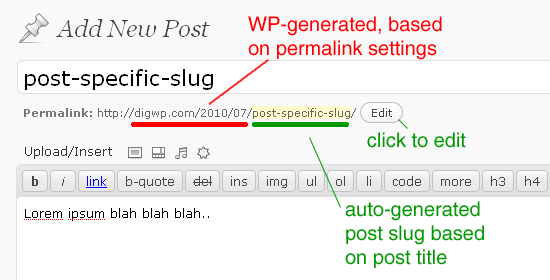
Cheers
R.Hi there!!! Help others from the community and mark any reply as solution if it solved your question. Mark as a solutionModeratorHi,
I see, I’ve noticed that this it happens also on our demo, I will add this on bug list and we will fix this in future.We will let you know
Cheers
R.Hi there!!! Help others from the community and mark any reply as solution if it solved your question. Mark as a solutionModeratorHi,
WE will fix this in next theme update until then please use this CSS by adding it to wp-admin -> theme options -> general settings -> quick css
COPY CODE@media(max-width:480px) { .kleo-mfp-zoom .mfp-container { padding: 0; margin: 0 auto; max-width: initial; } }Let me know
Cheers
R.Hi there!!! Help others from the community and mark any reply as solution if it solved your question. Mark as a solutionModeratorActiviry link returns a not found status http://www.commontrustcommunity.com/activity
Let me know when can i see this
Cheers
R.Hi there!!! Help others from the community and mark any reply as solution if it solved your question. Mark as a solutionModeratorYou’re welcome
Hi there!!! Help others from the community and mark any reply as solution if it solved your question. Mark as a solutionMarch 23, 2017 at 18:05 in reply to: Profile Navigation from Member and Group Profile get lost #156520ModeratorHi,
The group page can be defined at wp-admin -> settings -> buddypress -> pages -> groups
Choose your desired page there, but it’s recommended to have /groups/ page instead of /members/feature/groups/
This link: https://www.generationearth.at/en/members/feature/groups/ it redirects me to the https://www.generationearth.at/en/groups/ page
Also the page it’s empty not displayed nothing

On my profile all navigations are displayed

Let me know what navigation missing cuz I cannot figure out.
Related to the white group page, try to de-activate child theme and disable all plugins excluding BuddyPress and check again
Let me know
Cheers
RHi there!!! Help others from the community and mark any reply as solution if it solved your question. Mark as a solutionMarch 23, 2017 at 17:17 in reply to: Kleo Share options at the bottoms do not share the complete URL #156514ModeratorNot marked as solutionModeratorHi,
You can do that using this function
COPY CODEfunction overwrite_mebers_dir_meta() { $marital_status = bp_get_member_profile_data('field=Marital status'); $marital_status = bp_get_member_profile_data('field=I am a'); $output['age'] = apply_filters('kleo_bp_meta_after_age', get_member_age(bp_get_member_user_id())); $output['marital_status'] = $marital_status; $output['i_am_a'] = $i_am_a; return $output; } add_filter('kleo_bp_meta_fields', 'overwrite_mebers_dir_meta');Make sure to have identical name of the field as how you have added in backend on $marital_status and $marital_status variable and that’s all you should copy the code to function.php of your child theme
Cheers
R.Hi there!!! Help others from the community and mark any reply as solution if it solved your question. Ticket solutionModeratorYou can remove the profile menu items using CSS

Cheers
R.Hi there!!! Help others from the community and mark any reply as solution if it solved your question. Mark as a solutionModeratorHi,
Take a look here : https://drive.google.com/file/d/0Bxo5b6iHWRMwaHpUdmFnNGxpODg/view
It seems that it works according to the video.
Let me know exact steps to reproduce the issue
Cheers
R.Hi there!!! Help others from the community and mark any reply as solution if it solved your question. Mark as a solutionModeratorYou’re welcome
Cheers
R.Hi there!!! Help others from the community and mark any reply as solution if it solved your question. Mark as a solutionModeratorHi,
See the screenshot

So practically you invert the fields labels
Cheers
R.Hi there!!! Help others from the community and mark any reply as solution if it solved your question. Mark as a solutionMarch 22, 2017 at 19:20 in reply to: Change label on Login modal from username to email address #156390ModeratorGreat
Cheers
R.Hi there!!! Help others from the community and mark any reply as solution if it solved your question. Mark as a solutionModeratorHi,
Users use this plugin https://ro.wordpress.org/plugins/if-menu/ with KLEO successfully please give a try. Disable that plugin before installing this.
Cheers
R.Hi there!!! Help others from the community and mark any reply as solution if it solved your question. Mark as a solutionModeratorI mean in the initial case without theme update to disable child theme and to use parent only then try to use the matching system to see if it works, if not update theme having child theme activated then try again the matching system.
PS: The login credentials still not works.
Cheers
R.Hi there!!! Help others from the community and mark any reply as solution if it solved your question. Mark as a solutionModeratorIf you see that with default theme, it means that has nothing to do with KLEO and there it’s a BuddyPress problem or a compatibility issue between BuddyPress and other plugin
Let me know
Cheers
R.Hi there!!! Help others from the community and mark any reply as solution if it solved your question. Mark as a solutionMarch 22, 2017 at 18:21 in reply to: [ Solved + Solution ] Excerpt lenght in WordPress blog page #156376ModeratorHi,
The login credentials are not correct
Cheers
R.Hi there!!! Help others from the community and mark any reply as solution if it solved your question. Mark as a solutionModeratorHi,
Provide to me a screenshot with what you want to remove according to this reply #156243
Related to #156248 reply please add a notification to your account
Cheers
R>Hi there!!! Help others from the community and mark any reply as solution if it solved your question. Mark as a solutionMarch 22, 2017 at 17:45 in reply to: Kleo Share options at the bottoms do not share the complete URL #156372ModeratorNot marked as solutionMarch 22, 2017 at 17:37 in reply to: Kleo Share options at the bottoms do not share the complete URL #156370ModeratorNot marked as solutionMarch 22, 2017 at 17:28 in reply to: Change label on Login modal from username to email address #156369ModeratorHi,
Using FTP connect to your website and navigate to wp-content/themes/sweetdate-child/ create folder page-parts (wp-content/themes/sweetdate-child/page-parts) create a file named general-login-modal.php
In that you will paste this content: http://pastebin.com/raw/SQ6uqNbD
that’s all
Make sure to have child theme installed and activated
Cheers
R.Hi there!!! Help others from the community and mark any reply as solution if it solved your question. Mark as a solutionModeratorHi,
Using a plugin that can do this, you can try this one: https://wordpress.org/plugins/age-verify/screenshots/
Cheers
R.Hi there!!! Help others from the community and mark any reply as solution if it solved your question. Mark as a solutionModeratorThe Email client generates that because the subject or email address starts with the R letter so this is no theme related
Cheers
R.Hi there!!! Help others from the community and mark any reply as solution if it solved your question. Mark as a solutionModeratorI see this is a wp thing, not a theme but you can try to add the priority parameter to the filter
So paste again the code with 999 value as priority value
COPY CODEadd_filter('login_errors','login_error_message', 999); function login_error_message($error){ $error = "Test error message"; return $error; }Cheers
R.Hi there!!! Help others from the community and mark any reply as solution if it solved your question. Mark as a solutionModeratorHi,
Did you encounter some error ? Please try to test if using default wp theme you encounter same issue s ? Let me know
Cheers
R.Hi there!!! Help others from the community and mark any reply as solution if it solved your question. Mark as a solutionMarch 22, 2017 at 15:08 in reply to: Can I stick ''View Full Site' automatically on the mobile #156350ModeratorHi,
The title it’s visible using an iPhone viewing the contact page.
I cannot see the second screenshot and i can not figure where you are referring about the white background provide a screenshot that points out the white bg that you need to change
Cheers
R.Hi there!!! Help others from the community and mark any reply as solution if it solved your question. Mark as a solutionModeratorHi,
The login credentials, not works.Did you have updated BuddyPress to latest version these days ? If yes today we have released a new theme update that fixes some BuddyPress issue, can you please update the theme and test before providing correct admin credentials? Beside this please test the matching system after theme update with child theme de-activated.
Let me know
Cheers
R.Hi there!!! Help others from the community and mark any reply as solution if it solved your question. Mark as a solution -
AuthorPosts