

Forum Replies Created
-
Author
-
Radu
ModeratorNo problem
Cheers
R.Hi there!!! Help others from the community and mark any reply as solution if it solved your question. Mark as a solutionModeratorYou can check for theme update on wp-admin -> dashboard -> updates
Cheers
R.Hi there!!! Help others from the community and mark any reply as solution if it solved your question. Mark as a solutionModeratorHi,
I cannot see the slider problem here : https://drive.google.com/file/d/0Bxo5b6iHWRMwc3pLVDhLVHFXbE0/view
Where i can see it ?
Cheers
R.Hi there!!! Help others from the community and mark any reply as solution if it solved your question. Mark as a solutionModeratorHi,
This is the easy way to can do that
COPY CODE.header-scrolled .logo img { display:none; } .header-scrolled .navbar-header { background:url('https://cdn.seventhqueen.com/sq-support/wp-content/uploads/2016/10/7th-new-logo%402x.png'); background-size:cover; }Replace image link with your secondary version of logo
Cheers
R.Hi there!!! Help others from the community and mark any reply as solution if it solved your question. Mark as a solutionNovember 23, 2016 at 20:01 in reply to: get a error when i write a comment and click to post it #145147ModeratorHi,
Please follow these steps to enable wp debug then with those settings on, do same action as in video then check the debug.log file
- Connect to your server by FTP
- Look in root directory of your WordPress install and open wp-config.php
- Search for define( ‘WP_DEBUG’, false ); and change FALSE value to TRUE
COPY CODEdefine( 'WP_DEBUG', true );- After this line add this:
COPY CODEdefine( 'WP_DEBUG_LOG', true );WP_DEBUG_LOG is a companion to WP_DEBUG that causes all errors to also be saved to a debug.log log file inside the /wp-content/ directory. This is useful if you want to review all notices later or need to view notices generated off-screen (e.g. during an AJAX request or wp-cron run).
Repeat the described actions and then check the debug.log file and let me know what error appears.
After you have disabled the plugins try to see if the error persists.
Cheers
Hi there!!! Help others from the community and mark any reply as solution if it solved your question. Mark as a solutionModeratorHi,
Are you referring to the related posts section under each blog article ?
On our demo we don’t have that : https://seventhqueen.com/themes/kleo/blog/uncategorized/interior-design/
Cheers
R.Hi there!!! Help others from the community and mark any reply as solution if it solved your question. Mark as a solutionModeratorHI,
use those selectors
COPY CODE.woocommerce-billing-fields input, .woocommerce form .form-row textarea, .woocommerce-page form .form-row textarea { background: red; color:#fff; } .select2-container .select2-choice { background:red;color:#999; }Replace red with your color
Cheers
R.Hi there!!! Help others from the community and mark any reply as solution if it solved your question. Mark as a solutionModeratorNo problem
Cheers
R.Hi there!!! Help others from the community and mark any reply as solution if it solved your question. Mark as a solutionModeratorIt seems to be same cause, cache.
Try to leave that plugin deactivated and empty your browser cached.
Cheers
R.Hi there!!! Help others from the community and mark any reply as solution if it solved your question. Mark as a solutionModeratorHi,
The code that you have provided has nothing to do with your problem!
Try to re-save permalinks from wp-admin -> settings -> permalinks and also check if you have woocommerce active if not activate it and check again.
Do you have the latest version of WordPress ? If not update those
Do you have the latest version of Kleo theme ? If not update those
Do you have the latest version of plugins installed ? If not update those
If you de-activate all plugins excepting BuddyPress/bbPress it works? if yes enable back plugins one by one to identify what causes this.
If you de-activate the child theme it works ?
Let me know
Hi there!!! Help others from the community and mark any reply as solution if it solved your question. Mark as a solutionModeratorTake a look at your page source code

I cannot see any problem ?! If you are using facebook debug tool try to delete the cache for that page
Cheers
R.Hi there!!! Help others from the community and mark any reply as solution if it solved your question. Mark as a solutionModeratorHi, This is css selector to remove filter
COPY CODE.directory.members li#members-order-select { display: none !important; }Cheers
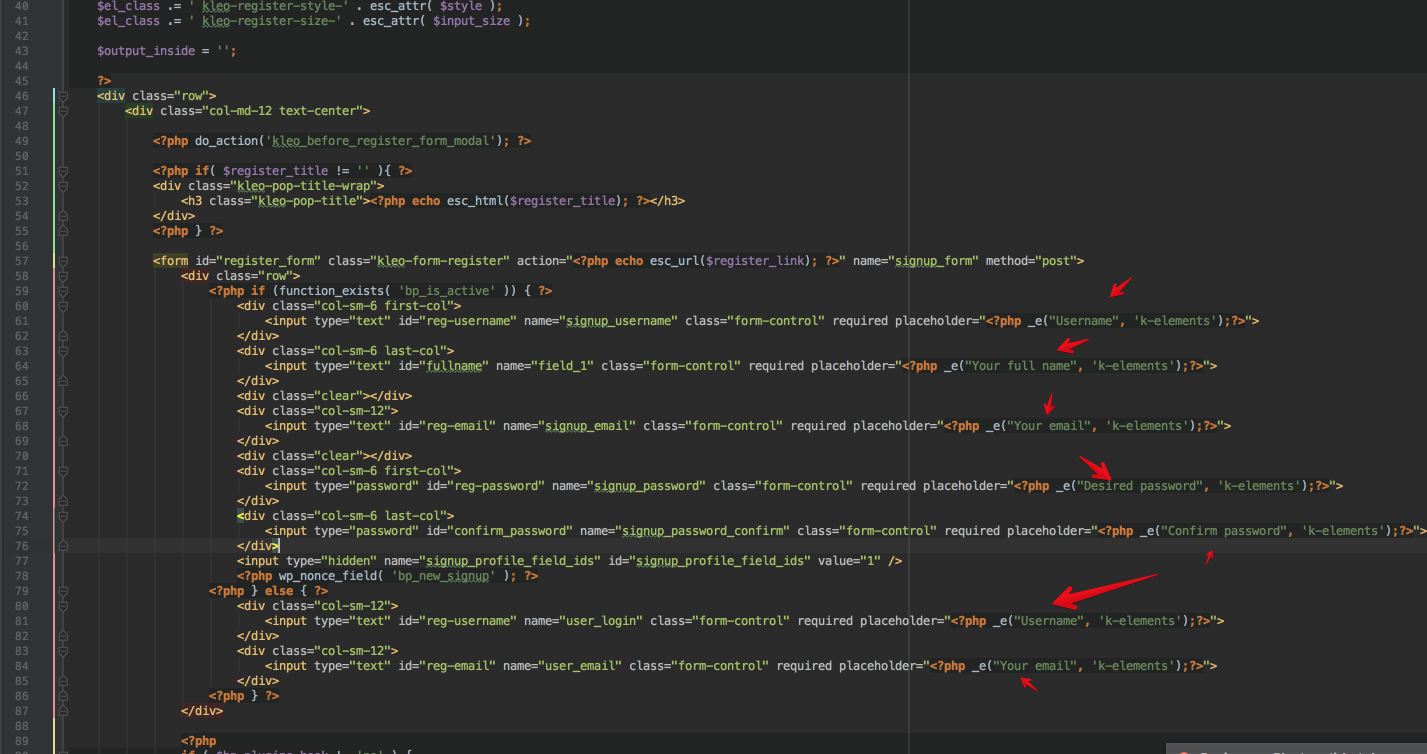
R.Hi there!!! Help others from the community and mark any reply as solution if it solved your question. Mark as a solutionModeratorI see, In this case copy this file : /wp-content/plugins/k-elements/shortcodes/templates/kleo_register.php kleo_register.php file here : /wp-content/themes/kleo-child/k_elements . Edit the kleo_register.php strings from the child theme
 Hi there!!! Help others from the community and mark any reply as solution if it solved your question. Mark as a solutionModerator
Hi,
Most sure the errors comes out from the minified js files by FWPC, purge and de-activate the plugin to check
Cheers
RHi there!!! Help others from the community and mark any reply as solution if it solved your question. Mark as a solutionModeratorHi,
After I connect via FTP,I’m immediately kicked out and this message it’s displayed, i need to connect using specific port and protocol ? if yes tell me
Error: The data connection could not be established: ETIMEDOUT – Connection attempt timed outCheers
R.Hi there!!! Help others from the community and mark any reply as solution if it solved your question. Mark as a solutionModeratorHi,
We are working on this matter, in future you will have possibility to choose the sidebar from the blog panel from theme options, for the moment use one of those plugins as temporary solution :
https://wordpress.org/plugins/widget-logic/
https://wordpress.org/plugins/content-aware-sidebars/
Cheers
R.Hi there!!! Help others from the community and mark any reply as solution if it solved your question. Mark as a solutionModeratorOk
Let me knowHi there!!! Help others from the community and mark any reply as solution if it solved your question. Mark as a solutionModeratorNo problem
Cheers
R.Hi there!!! Help others from the community and mark any reply as solution if it solved your question. Mark as a solutionModeratorHi,
Take a look, they are displaying normally
 Hi there!!! Help others from the community and mark any reply as solution if it solved your question. Mark as a solutionNovember 23, 2016 at 17:24 in reply to: Paid Membership Pro Levels Page Not Displaying Correctly #145110Moderator
Hi,
Do you have the latest version of WordPress ? If not update those
Do you have the latest version of Kleo theme ? If not update those
Do you have the latest version of plugins installed ? If not update those
If you de-activate all plugins excepting BuddyPress/bbPress/pmpro it works? if yes enable back plugins one by one to identify what causes this.
If you de-activate the child theme it works ?
Let me know
Hi there!!! Help others from the community and mark any reply as solution if it solved your question. Mark as a solutionModeratorHi,
Add this css to wp-admin -> theme options -> general settings -> quick css
COPY CODE.alternate-color .colored-icons .feature-item:hover .feature-icon { border: 1px solid red; }Cheers
R.Hi there!!! Help others from the community and mark any reply as solution if it solved your question. Mark as a solutionModeratorHi,
After theme update it’s recommended to check also for plugins update from wp-admin -> appearance -> install plugins. Update plugins with update message.
Try to re-save permalinks from wp-admin -> settings -> permalinks.
Try to de-activate child theme when you do this procedure.
Let me know
Cheers
R.Hi there!!! Help others from the community and mark any reply as solution if it solved your question. Mark as a solutionModeratorHi,
Maybe a code from your child theme /functions.php ?
You can keep off users from wp-admin using this kinf of plugins : https://wordpress.org/plugins/remove-dashboard-access-for-non-admins/
Cheers
R.Hi there!!! Help others from the community and mark any reply as solution if it solved your question. Mark as a solutionNovember 22, 2016 at 20:22 in reply to: I imported the demo content and set the homepage, but it is blank #145044ModeratorYou’re welcome
Cheers
R.Hi there!!! Help others from the community and mark any reply as solution if it solved your question. Mark as a solutionModeratorWhere i can see the site please?
Hi there!!! Help others from the community and mark any reply as solution if it solved your question. Mark as a solutionModeratorHi,
Do you have the latest version of WordPress ? If not update those
Do you have the latest version of Kleo theme ? If not update those
Do you have the latest version of plugins installed ? If not update those
If you de-activate all plugins excepting BuddyPress/bbPress it works? if yes enable back plugins one by one to identify what causes this.
If you de-activate the child theme it works ?
Let me know
Hi there!!! Help others from the community and mark any reply as solution if it solved your question. Mark as a solutionModeratorHI,
I see,
Hi,
Do you have the latest version of WordPress ? If not update those
Do you have the latest version of swwtdate theme ? If not update those
Do you have the latest version of plugins installed ? If not update those
If you de-activate all plugins excepting BuddyPress/bbPress it works? if yes enable back plugins one by one to identify what causes this.
If you de-activate the child theme it works ?
Let me know
Hi there!!! Help others from the community and mark any reply as solution if it solved your question. Mark as a solutionNovember 22, 2016 at 20:14 in reply to: Don’t show “Clients Archive” and “Member” pages on search engines #145040ModeratorNo problem
Cheers
RHi there!!! Help others from the community and mark any reply as solution if it solved your question. Mark as a solution -
AuthorPosts