

Forum Replies Created
-
Author
-
Radu
ModeratorWhy you don’t hide via CSS all inputs for reply comm ?
Cheers
R.Hi there!!! Help others from the community and mark any reply as solution if it solved your question. Mark as a solutionModeratorHi,
From what I know audio and videos are somehow de-activated on mobile for speed improvements and for bandwidth saving.
Cheers
R.Hi there!!! Help others from the community and mark any reply as solution if it solved your question. Ticket solutionModeratorHi,
There we cannot modify the color via css because there it’s using a sprite (a image) : https://www.xn--moa-8ma.com/wp-content/themes/kleo/assets/img/sprite.png
That you should download and edit it in photoshop or in a similar program then re-upload it
Cheers
R.Hi there!!! Help others from the community and mark any reply as solution if it solved your question. Mark as a solutionModeratorHi,
What plugin are you using for translations ?
Hi there!!! Help others from the community and mark any reply as solution if it solved your question. Mark as a solutionSeptember 13, 2016 at 19:54 in reply to: Add badges under cover photo depending on profile fields #136000ModeratorSo you have solved the problem?
Cheers
R.Hi there!!! Help others from the community and mark any reply as solution if it solved your question. Mark as a solutionModeratorBy using a plugin like this : https://wordpress.org/plugins/restrict-content/
Cheers
R.Hi there!!! Help others from the community and mark any reply as solution if it solved your question. Mark as a solutionModeratorWhat do you mean by not working ? I’m able to click on author and also for the rest of the links from meta information, can you elaborate ?
Cheers
R.Hi there!!! Help others from the community and mark any reply as solution if it solved your question. Mark as a solutionSeptember 13, 2016 at 19:19 in reply to: admin toolbar redirecting to front page instead of the dashboard for non-admin users #135994ModeratorHi,
If you will de-activate kleo theme and you activate a wp default one you encounter same issue ?
Let me know
Cheers
R.Hi there!!! Help others from the community and mark any reply as solution if it solved your question. Mark as a solutionSeptember 13, 2016 at 18:47 in reply to: Problem updating Visual Composer and K-Elements after updating to 4.13 #135991ModeratorNot marked as solutionModeratorHi,
Most probably this is caused by sitewide option transparent menu, you should set it OFF

If you want to have a page with menu transparent you can enable it only for that certain page from Theme general settings panel that be find under page backend content area

Cheers
R.Hi there!!! Help others from the community and mark any reply as solution if it solved your question. Mark as a solutionModeratorHi,
By default this option and also there is no quick solution and in this case something should be developed custom for your client requirements.
If you have some PHP knowledge you can inspire from this : https://archived.seventhqueen.com/forums/topic/restrict-my-site/#post-133682
Cheers
R.Hi there!!! Help others from the community and mark any reply as solution if it solved your question. Mark as a solutionModeratorYes, it’s already there and it seems that the function returns the actual URL from where was called.
IT seems to be odd using a function like this but practically it works.Cheers
R.Hi there!!! Help others from the community and mark any reply as solution if it solved your question. Mark as a solutionSeptember 13, 2016 at 17:37 in reply to: how to edit the text on Kleo Social Share shortcode #135978ModeratorI’m happy that little guide helps you
Have a nice week
Cheers
R.Hi there!!! Help others from the community and mark any reply as solution if it solved your question. Mark as a solutionModeratorHi,
If you switch our demo with a WordPress default one, you are able to translate ? If not it means that this problem it’s not related to our theme, so it means that the pmpro should do something regarding this
Cheers
R.Hi there!!! Help others from the community and mark any reply as solution if it solved your question. Ticket solutionModeratorHi,
Check this out :
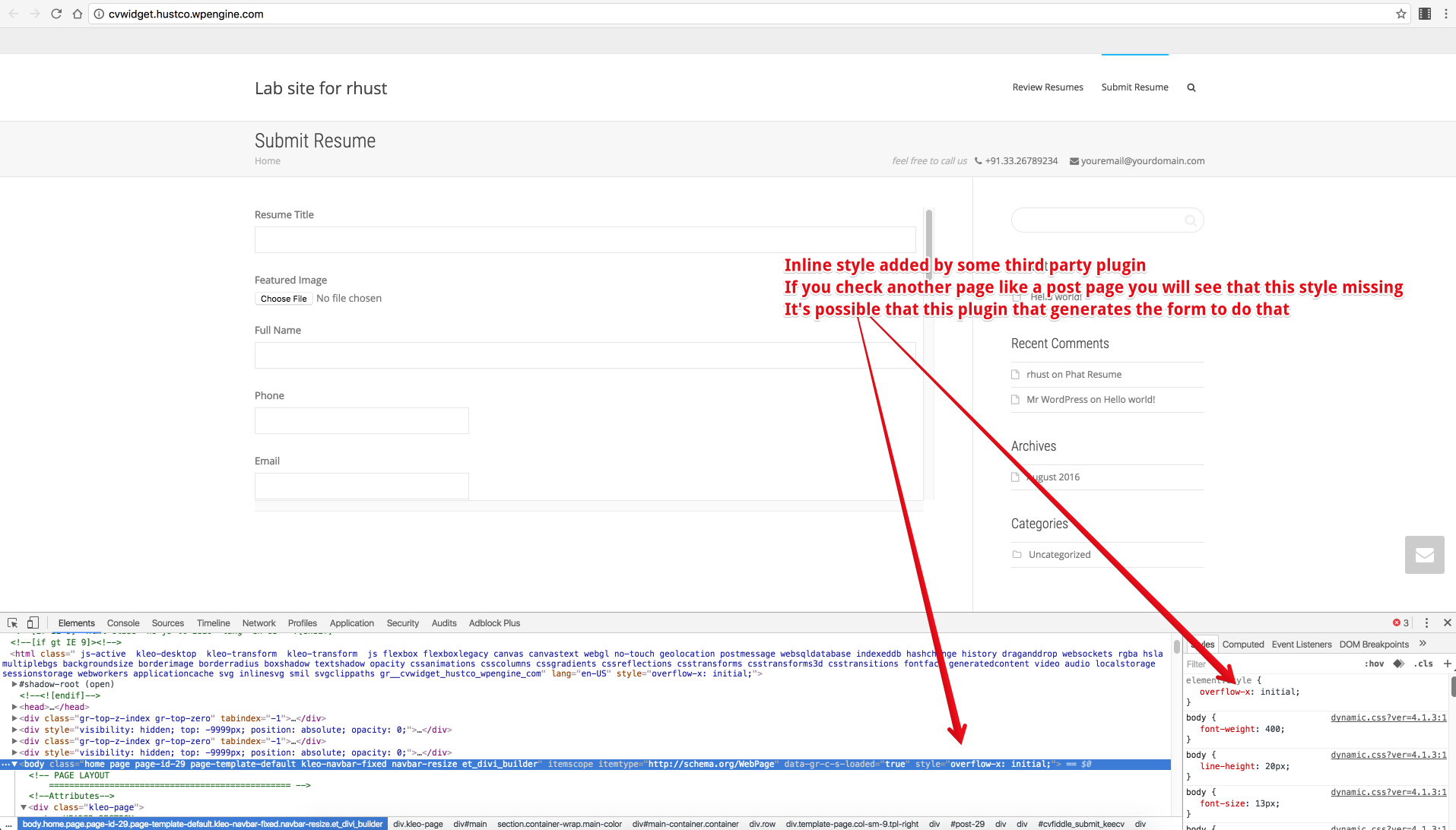
If you will use this CSS
COPY CODEbody { overflow-y: scroll !important; }You will be able to scroll on that certain page… so it seems that that plugin adds that inline style with overflow:initial.
After you add that CSS don’t forget to remove this :
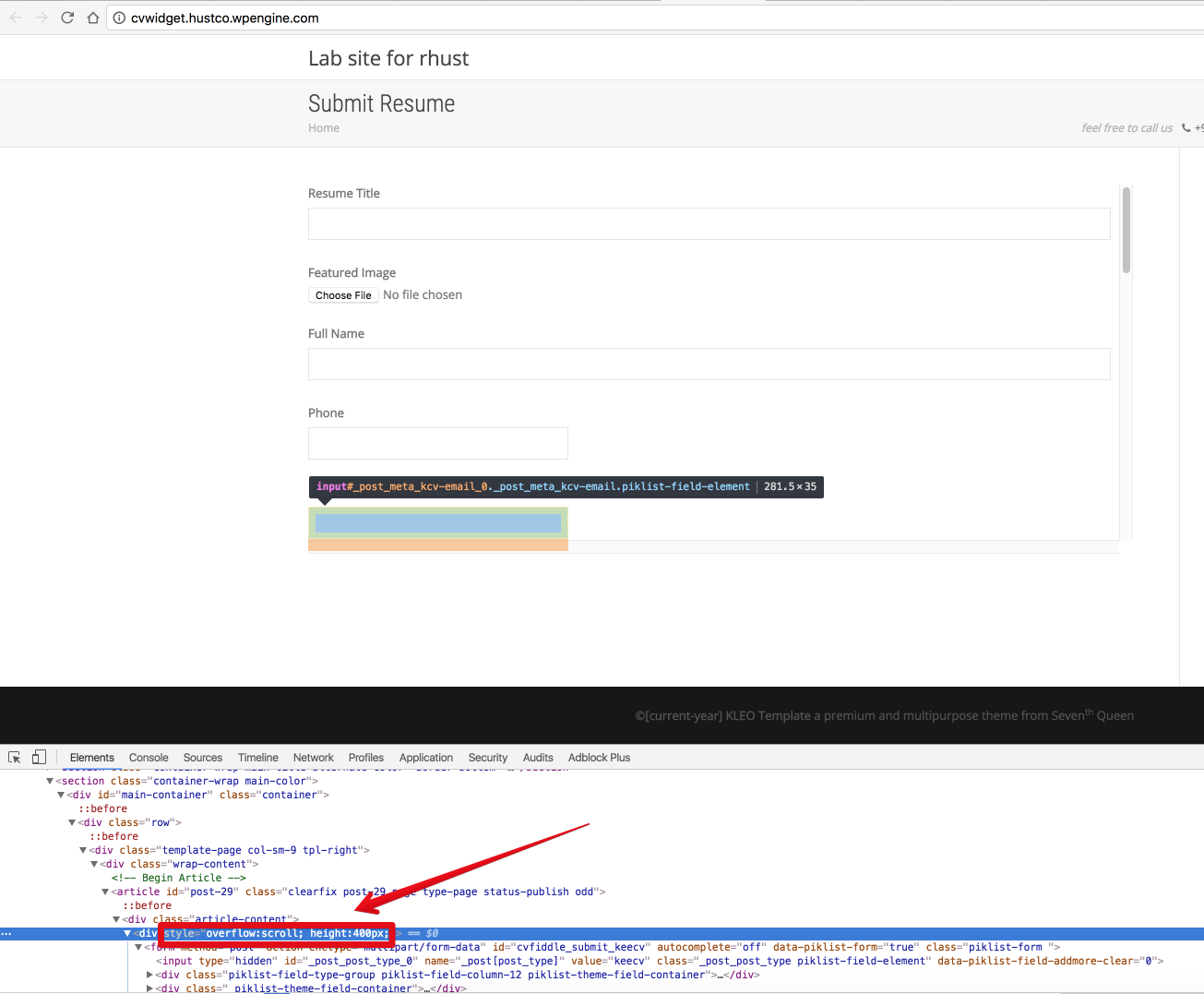
Cheers
R.Hi there!!! Help others from the community and mark any reply as solution if it solved your question. Ticket solutionModeratorHi,
Try to do the following :
– Update WordPress to latest version and check again if this not solves read next
– De-activate child theme and check again if this not solves read next
– De-activate all plugins excluding visual composer,k-elements and BuddyPress and check again if this not solves read next
Let me know
Cheers
R.Hi there!!! Help others from the community and mark any reply as solution if it solved your question. Ticket solutionModeratorI don’t understand what hosting recommends you, in my previous post i asked you about FTP details to can check something, i wait for details
Cheers
R.Hi there!!! Help others from the community and mark any reply as solution if it solved your question. Mark as a solutionModeratorHi, I’ve tried to reproduce this on my local environment this but i cannot, you have the possibility to put your website online and to provide to me FTP and Wp-admin access to investigate this issue ?
Try also to un-install BuddyPress and to re-install…
Let me know
Cheers
R.Hi there!!! Help others from the community and mark any reply as solution if it solved your question. Mark as a solutionModeratorThank you !
Good luck with your project.
You’re welcome
Have a nice week
Cheers
R.Hi there!!! Help others from the community and mark any reply as solution if it solved your question. Mark as a solutionModeratorHi,
1. Take a look at this screenshot

2. Done..
R.
Hi there!!! Help others from the community and mark any reply as solution if it solved your question. Ticket solutionModeratorThe lack of possibility to click on that buttons I’ve told you in my previous post, so i’ve tried to access your dashboard again to make some tests but it says :

Anyway please perform a full backup(database+files) then remove all languages and add them again, and don’t translate nothing related to the menu to test again, if the problem disappears it means that some character or some tag was unclosed.
Let me know
Cheers
R.Hi there!!! Help others from the community and mark any reply as solution if it solved your question. Mark as a solutionModeratorHi, Sure, please replace this file : /kleo/wp-content/themes/kleo/lib/post-types.php with the attached one after you unzip it. This will be fixed in next theme update Cheers R.September 12, 2016 at 20:09 in reply to: how to edit the text on Kleo Social Share shortcode #135861ModeratorTheme strings and plugins strings can easily be changed by using Loco Translate plugin https://wordpress.org/plugins/loco-translate/
A small introduction on how translations work
Translatable strings can come from the theme or from the installed plugins. You need to translate the theme or the plugin depending on what section of the site your string is found.
For example if your string is on your BuddyPress profile then most probably you will need to translate BuddyPress plugin. If you are on the Forums section of your site then bbPress plugin should be the one that needs to be translated. Another example is the rtMedia plugin that adds the Media links to BuddyPress and if you want to translate it then this plugin will contain the string.
Follow these steps to get you started:
- Install Loco Translate plugin
- Go to the plugin dashboard: WP Admin – Tools – Manage translations
- Find the theme or plugin in the list.
- If the language isn’t already in the list then click Add new language, choose your language and if you are asked where you want to save the language files choose global language directory ( wp-content/languages/ ).
- Press SYNC button to synchronise your translation with the provided .pot file
- Search for the string you want to translate and add your translated string.
- Press Save when you finished your translation.
Note: You will have to set the language for your blog from WP-admin – Settings – General – Site Language – Choose your language
Cheers
Hi there!!! Help others from the community and mark any reply as solution if it solved your question. Mark as a solutionModeratorHi,
So.. from what I see your problem it’s related to child theme if you de-activate it you have the cover photo functionality and if you turn the child on, they get rig… in this case it means that some of you modifications from child causes this…
Do you have same issue running Kleo 4.1.3 with and without child ?
Cheers
R.Hi there!!! Help others from the community and mark any reply as solution if it solved your question. Mark as a solutionModeratorHi,
Check if you have rtmedia plugin installed and activated
Also make sure you have those options ON

Cheers
R.Hi there!!! Help others from the community and mark any reply as solution if it solved your question. Mark as a solutionSeptember 12, 2016 at 19:45 in reply to: My revolution slider button won’t work no matter what I try #135851ModeratorHi,
I saw that but there is’a simple div that contain that text, there is no a href tag so you cannot click on the text because doesn’t have any link
So, add link to that button
Cheers
R.Hi there!!! Help others from the community and mark any reply as solution if it solved your question. Mark as a solutionModeratorThe missing slider from material colors. This is the only link that you have provided from your site in the previous post.
For colors you will have to set this : Theme options – Styling options – Header – Color Preset – Deep Purple/Amber but it will change this for entire site/entire demos, on our demo that demo it’s installed on separate wp install.
R.
Hi there!!! Help others from the community and mark any reply as solution if it solved your question. Mark as a solution -
AuthorPosts